EducationSoftwareStrategy.com
StrategyCommunity

Knowledge Base

Product

Community

Knowledge Base

TopicsBrowse ArticlesDeveloper Zone

Product

Download SoftwareProduct DocumentationSecurity Hub

Education

Tutorial VideosSolution GalleryEducation courses

Community

GuidelinesGrandmastersEvents
x_social-icon_white.svglinkedin_social-icon_white.svg
Strategy logoCommunity

© Strategy Inc. All Rights Reserved.

LegalTerms of UsePrivacy Policy
  1. Home
  2. Topics

KB223709: The Drill option disappears from the context menu after creating a derived element in MicroStrategy Web 9.4.1


Community Admin

• Strategy


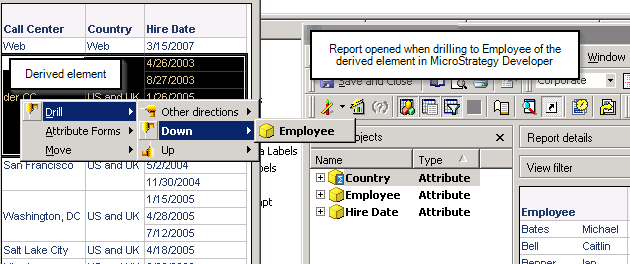
After creating a derived element for an attribute in MicroStrategy Web 9.4.1, users can no longer drill from any attribute element; only the attribute header can be drilled on. However, drilling on the elements is still allowed in MicroStrategy Developer 9.4.1.

SYMPTOM:
After creating a derived element for an attribute in Strategy Web 9.4.1, users can no longer drill from any attribute element; only the attribute header can be drilled on. However, drilling on the elements is still allowed in Strategy Developer 9.4.1.
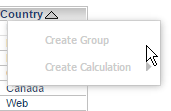
Notice below how the option to drill no longer appears in the context menu.
ka04W000000Of3AQAS_0EM4400000025jH.jpeg

 
STEPS TO REPRODUCE:
Follow these steps in a Strategy Tutorial project:
  • Create a blank report and add Country to the rows.
  • Add any metric to the columns.
  • Run the report.
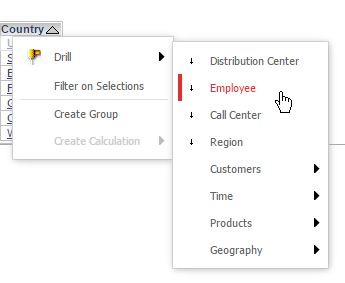
  • Right-click USA and mouse over the “Drill” menu.
  • Drill to any employee, as shown below, and note that all the employees for USA appear.
ka04W000000Of3AQAS_0EM4400000025jE.jpeg
  • Click the “back” arrow within the Strategy Web 9.4.1 interface.
  • Right-click the Country attribute header and open the derived element editor.
  • Create a derived element that combines USA and UK and name the element “US and UK”.
  • Right-click any element of the Country attribute. Note that the drill menu is no longer available, as shown below.
ka04W000000Of3AQAS_0EM4400000025jH.jpeg
  • Note: right-clicking the attribute header will allow drilling for the entire column.
  • Run the same report with the new derived element in Strategy Developer 9.4.1.
  • Right-click any element of Country and make a drill selection.
  • The report successfully drills to an attribute element and displays the correct metrics.
ka04W000000Of3AQAS_0EM4400000025j9.jpeg

 
CAUSE:
This is a known limitation in Strategy Web 9.4.1.
 
ACTION:
Currently this issue is still being reviewed for feasibility by our Technology team and it is not scoped for any upcoming scheduled Strategy release. Strategy will continue to investigate and post updates as soon as they are available.


Comment

0 comments

Details

Knowledge Article

Published:

June 13, 2017

Last Updated:

June 13, 2017