EducationSoftwareStrategy.com
StrategyCommunity

Knowledge Base

Product

Community

Knowledge Base

TopicsBrowse ArticlesDeveloper Zone

Product

Download SoftwareProduct DocumentationSecurity Hub

Education

Tutorial VideosSolution GalleryEducation courses

Community

GuidelinesGrandmastersEvents
x_social-icon_white.svglinkedin_social-icon_white.svg
Strategy logoCommunity

© Strategy Inc. All Rights Reserved.

LegalTerms of UsePrivacy Policy
  1. Home
  2. Topics

KB224844: How to Create a Report Services Document Header/Footer Only for Exports or Printing with MicroStrategy Web.


Community Admin

• Strategy


How to Create a Report Services Document Header/Footer Only for Exports or Printing with MicroStrategy Web.

Page headers/footers can be configured for printing and exporting purposes via Strategy Web Preferences for reports only. To set up a page header/footer for a Report Services Document to export or print, the Report Services Document's Page Header and Footer can be configured. 
 
By default, the Page Header/Page Footer is seen by web users:
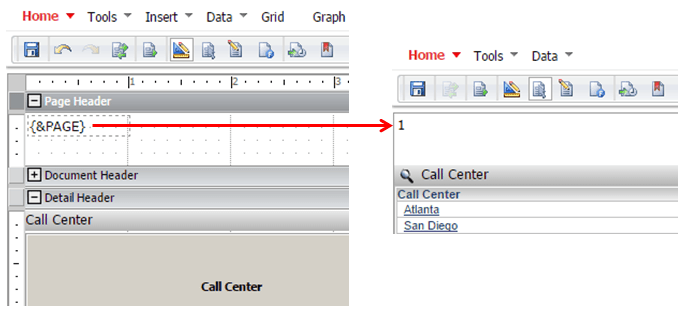
ka04W000000Oc7TQAS_0EM4400000025ns.jpeg

 
However, these page headers/footers may need to be configured so that the users do not see these headers/footers when viewing the documents in Strategy Web.  To do so, follow these steps:
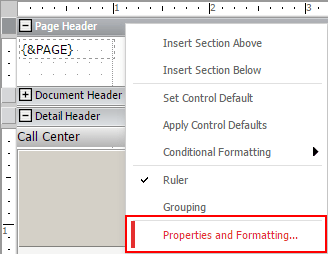
 

  • In Design view, right click on Page Header/Page Footer section bar > Properties and Formatting:
ka04W000000Oc7TQAS_0EM4400000025ny.jpeg
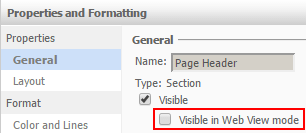
  • In the Properties (General) section, uncheck the box for Visible in Web View mode:
ka04W000000Oc7TQAS_0EM4400000025nw.jpeg
  • Save the document.

After this change, the Page Header/Page Footer for Report Services Documents will not be seen by web users.  The Page Header/Page Footer will be seen when the user exports the document or prints the document.


Comment

0 comments

Details

Knowledge Article

Published:

May 26, 2017

Last Updated:

May 26, 2017