EducationSoftwareStrategy.com
StrategyCommunity

Knowledge Base

Product

Community

Knowledge Base

TopicsBrowse ArticlesDeveloper Zone

Product

Download SoftwareProduct DocumentationSecurity Hub

Education

Tutorial VideosSolution GalleryEducation courses

Community

GuidelinesGrandmastersEvents
x_social-icon_white.svglinkedin_social-icon_white.svg
Strategy logoCommunity

© Strategy Inc. All Rights Reserved.

LegalTerms of UsePrivacy Policy
  1. Home
  2. Topics

KB225832: Using a button on document that has mstripad://?evt=3175 call to switch to annotation mode, the Annotation hint box pop-up window does not appear each time it is triggered after the Mobile app was upgraded to 9.4.1 Update 4


Community Admin

• Strategy


This Knowledge Base article describes the current behavior in 9.4.1 Update 4 where using a button on document that has mstripad://?evt=3175 call to switch to annotation mode, the Annotation hint box pop-up window does not appear each time it is triggered. This works as designed. The behavior of Annotation hint box has been changed in the Mobile app 9.4.1 Update 4 due to customers’ request. See Cause section in this technical note for more details on a new behavior. There are workarounds available. 

 SUMMARY:
This technical note describes the current behavior in 9.4.1 Update 4 where using a button on document that has mstripad://?evt=3175 call to switch to annotation mode, the Annotation hint box pop-up window does not appear each time it is triggered. This works as designed. The behavior of Annotation hint box has been changed in the Mobile app 9.4.1 Update 4 due to customers’ request. See Cause section in this technical note for more details on a new behavior. There are workarounds available. 
 
SYMPTOM:
A user designs a document that has a button to get to Annotation mode using the call - mstripad://?evt=3175. In prior versions of app, the annotation hint box displayed when Annotation mode was called; however, after upgrading to the Mobile app to 9.4.1 Update 4 version, a user does not see the hint box each time the Annotation mode is triggered.
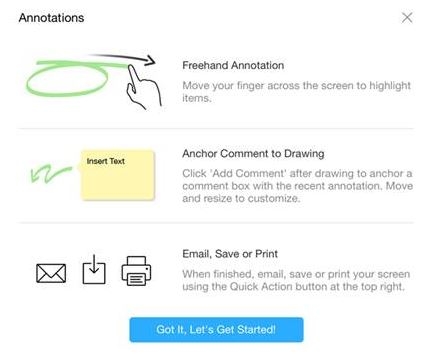
The Annotation hint box looks like shown below:
ka04W000000OhP3QAK_0EM4400000029z4.jpeg


STEPS TO REPRODUCE:

  1. In Strategy Tutorial, create a Report Services Document. Use any report as a dataset.
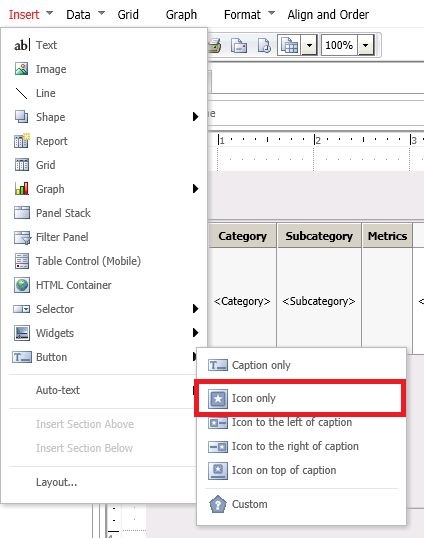
  2. Add any objects to the document and one button:
ka04W000000OhP3QAK_0EM4400000029z2.jpeg

 
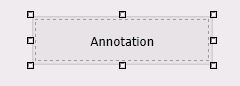
3.  Name the button as Annotation:
 

ka04W000000OhP3QAK_0EM4400000029zC.jpeg
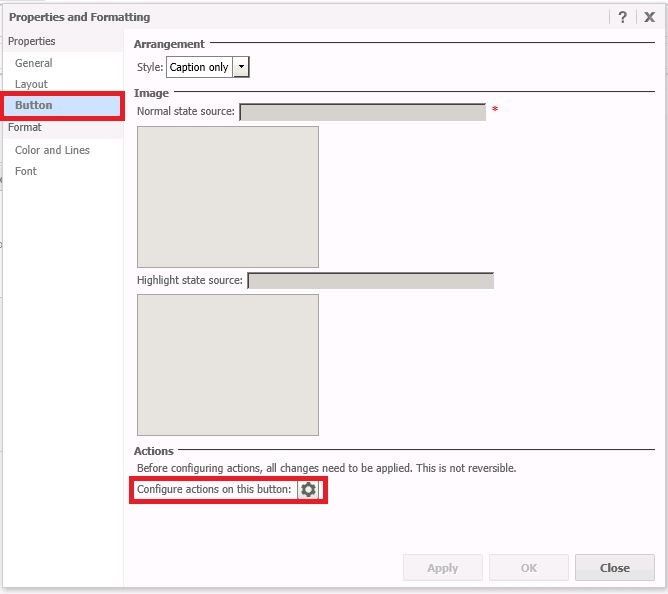
  1. Select Properties and Formatting for the button and open Button section:


ka04W000000OhP3QAK_0EM4400000029zB.jpeg


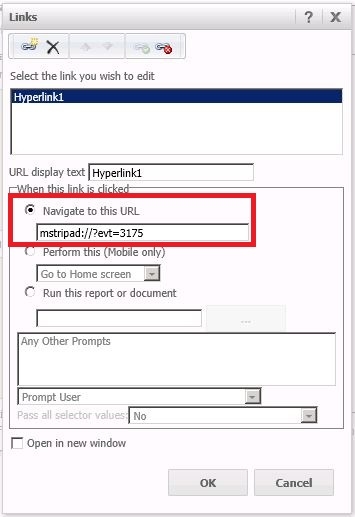
  1. On the bottom of the window, click on the icon next to “Configure actions on this button”. In a new window select “Navigate to this URL” and type mstripad://?evt=3175


ka04W000000OhP3QAK_0EM4400000029z6.jpeg


  1. Save the document 
  2. On iPad with MSTR 9.4.1 Update 4 installed, run the document and click on Annotation button to go to Annotation mode. The Annotation hint box displays, however, after triggering it several times, it does not pop up any longer.
ka04W000000OhP3QAK_0EM4400000029z5.jpeg

  
CAUSE:
The behavior of Annotation hint box has been changed. The original behavior was that the hint box displays for the first three times when the user enters to the annotation mode. However, per customers’ request, Technology changed the behavior: during first three times, if a user taps on "Okay I've got it" button, the hint box will not be shown any longer. If the user taps on the "close" button in the top right corner of the hint box, it will display the hint box again, if the total time is less than 3. 
If an user concerns about there is no obvious hint to remind that the annotation mode is already on without the hint box, a user can easily identify the blue colored frame as a sign of annotation mode.

 

ka04W000000OhP3QAK_0EM4400000029z7.jpeg


ACTION/WORKAROUND: 

  1. If possible, add some guidance text on the button, which is used to trigger the annotation mode to inform about :

-    Difference between “Okay I've got it” and "Close" buttons
-    The sign of being in annotation mode: a blue frame around the document and any manipulation, such as tapping, will behave as the annotation mode.

ka04W000000OhP3QAK_0EM4400000029z3.jpeg


ADDITIONAL TROUBLESHOOTING:
If the steps above do not resolve the issue, please consider calling Strategy tech support with the following information of troubleshooting already done:

  • Results of testing the workarounds, provide  steps to reproduce the issue, an engineer will test to confirm if it is the same issue

 
The Strategy Internal Reference Number for the issue discussed in this technical note is 1007230


Comment

0 comments

Details

Knowledge Article

Published:

May 23, 2017

Last Updated:

May 23, 2017