EducationSoftwareStrategy.com
StrategyCommunity

Knowledge Base

Product

Community

Knowledge Base

TopicsBrowse ArticlesDeveloper Zone

Product

Download SoftwareProduct DocumentationSecurity Hub

Education

Tutorial VideosSolution GalleryEducation courses

Community

GuidelinesGrandmastersEvents
x_social-icon_white.svglinkedin_social-icon_white.svg
Strategy logoCommunity

© Strategy Inc. All Rights Reserved.

LegalTerms of UsePrivacy Policy
  1. Home
  2. Topics

KB225916: A Datamart Report won't write data back if executed via URL API that also passes prompt answers in MicroStrategy Web 9.4.1-10.x


Community Admin

• Strategy


This Technical Note describes a known behavior in MicroStrategy Web 9.4.1 that causes prompt values not to be passed to a Datamart Report that is executed from a URL API. If no prompt values are passed, the user will be shown a page to run the report manually from the MicroStrategy Web 9.4.1-10.x interface, which successfully writes the data back to the table specified for the Datamart.

SUMMARY:
This Technical Note describes a known behavior in Strategy Web 9.4.1-10.x that causes prompt values not to be passed to a Datamart Report that is executed from a URL API. If no prompt values are passed, the user will be shown a page to run the report manually from the Strategy Web 9.4.1-10.x interface, which successfully writes the data back to the table specified for the Datamart.
 
SYMPTOM:
A Datamart report that runs successfully from Strategy Developer 9.4.1-10.x will not be able to write back data to the table if that same Datamart is called from a URL API that includes prompt value answers in Strategy Web 9.4.1. The user must remove the "&valuePromptAnswers=" parameter, manually answer the prompts, and execute the Datamart from the Strategy Web 9.4.1 interface in order for information to be sent back to the table.
 
STEPS TO REPRODUCE:
To see the behavior of Datamarts called by URL API described in this technical note, take the following steps in Strategy Tutorial:

  • In Strategy Developer 9.4.1-10.x, create a filter that has two simple value prompts for dates, one for the start date, and one for the end date.
  • Select a date range for each prompt, as shown below.
ka0PW0000000kyvYAA_0EM4400000025it.jpeg
  • Create a Datamart report.
  • Add the date value prompt to the Datamart.
  • Get the base URL API for the Datamart report and pass in value prompt answers for the start and end dates that are within the previously specified ranges.
    For example, use this tag to pass value prompts for the date range of January 10, 2010 to January 16, 2010:
    
    &valuePromptAnswers=1%2F10%2F2010^1%2F16%2F2010
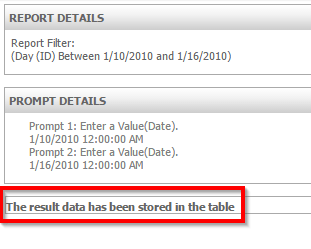
  • Paste the URL API into the browser and press Enter. The report will automatically run. Note the message in the Report Details, shown below.

ka0PW0000000kyvYAA_0EM4400000025iu.jpeg
  • Remove the &valuePromptAnswers parameter from the URL.
  • Run the URL API again.
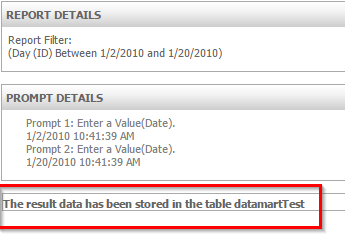
  • Manually choose the desired prompt values. Select "Run Report", as shown below.

ka0PW0000000kyvYAA_0EM4400000025iv.jpeg
ka0PW0000000kyvYAA_0EM4400000025ix.jpeg
  • Note the difference in the Report Details in comparison to when the URL API passes prompt values. When the Datamart executes successfully, the message will indicate the name of the table that contains the data.
     

CAUSE:
This is a known limitation in Strategy Web 9.4.1-10.x when using URL API to execute special reports such as Datamart report with prompts.
WORKAROUND:
Add an extra parameter("execFlags=83886464") in the URL API to get the correct result, like: "<URL API for the Datamart report>&valuePromptAnswers=1%2F10%2F2010^1%2F16%2F2010&execFlags=83886464" to workaround the issue.
Note: The "execFlags=83886464" only applies to Datamart reports, and is generated by four flags defined in EnumDSSXMLExecutionFlags.java. Users can find the definition in https://www2.microstrategy.com/producthelp/Current/WebAPIReference/com/microstrategy/webapi/EnumDSSXMLExecutionFlags.htm.
public static final int DssXmlExecutionUseCache = 0x00000080;
public static final int DssXmlExecutionUpdateCache = 0x00000100;
public static final int DssXmlExecutionCheckWebCache = 0x01000000;
public static final int DssXmlExecutionGenerateDatamart = 0x04000000;
To execute other special reports using URL API, users need to replace the 4th flag to the corresponding values.
ACTION:
This issue was reviewed by our Technology team for feasibility and will not be scoped for a code fix in any upcoming Strategy release.


Comment

0 comments

Details

Knowledge Article

Published:

May 22, 2017

Last Updated:

February 14, 2024