EducationSoftwareStrategy.com
StrategyCommunity

Knowledge Base

Product

Community

Knowledge Base

TopicsBrowse ArticlesDeveloper Zone

Product

Download SoftwareProduct DocumentationSecurity Hub

Education

Tutorial VideosSolution GalleryEducation courses

Community

GuidelinesGrandmastersEvents
x_social-icon_white.svglinkedin_social-icon_white.svg
Strategy logoCommunity

© Strategy Inc. All Rights Reserved.

LegalTerms of UsePrivacy Policy
  1. Home
  2. Topics

KB226307: Using an email subscription for the document with a dark background and using HTML as a delivery format, a user opens the document in Outlook and notices white dots appear on the document in MicroStrategy Web 9.4.1 Hotfix 4.


Community Admin

• Strategy


Article outlines an issue whereby an email subscription using HTML delivery format and a dark background shows white dots upon opening in Outlook

 SUMMARY:
This technical note describes the issue found in Strategy Web 9.4.1 Hotfix 4 where, using email subscription with HTML content in the body of the email, a subscribed document with a dark background, viewed by users in Outlook, displays white dots. This issue has been classified as a defect by Strategy. There are workarounds available for this issue. Currently this issue is still being reviewed for feasibility by our Technology team and it is not scoped for any upcoming scheduled Strategy release.
 
SYMPTOM:
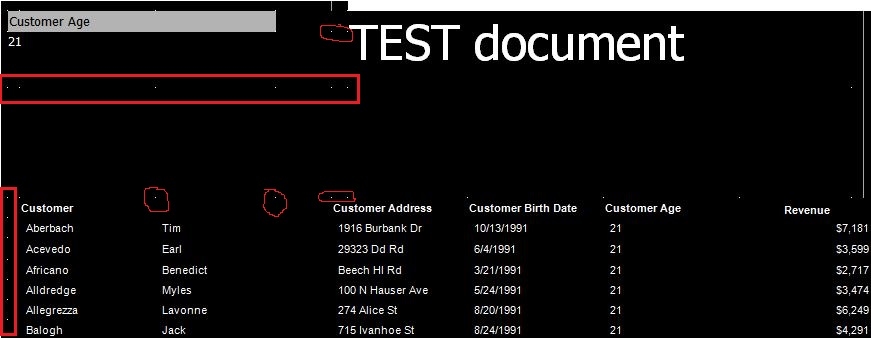
A user has a document with a dark background created in Strategy 9.4.1 Hotfix 4. When the user uses an email subscription with HTML content, it is noticed that, when the document is opened in installed on a computer Outlook, white dots appear on the document as shown below:
ka04W000001MKjtQAG_0EM440000002HEx.jpeg

   
STEPS TO REPRODUCE:

  1. In Strategy Tutorial, create a Report Services document and several objects such as a grid, a text box and a selector.
  2. Make background of the document black or very dark.
  3. Select "Subscribe to Email" under Home menu
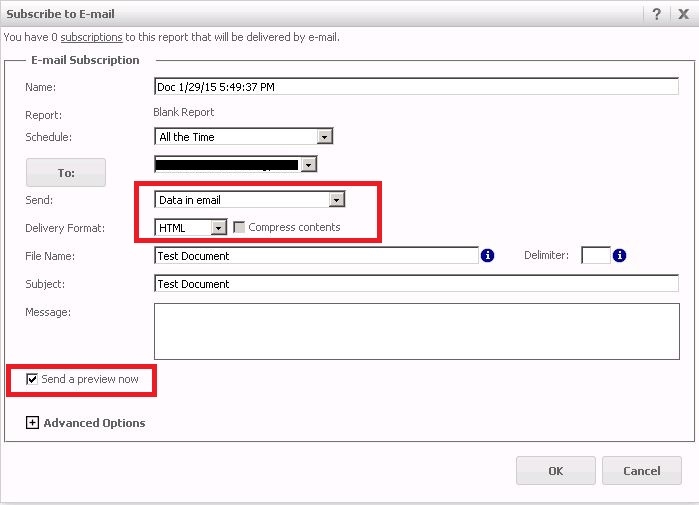
  4. In “Subscribe to Email” window select “Data in email” and “HTML” for delivery format. Enable “Send preview now” to trigger the subscription immediately
ka04W000001MKjtQAG_0EM440000002HEv.jpeg

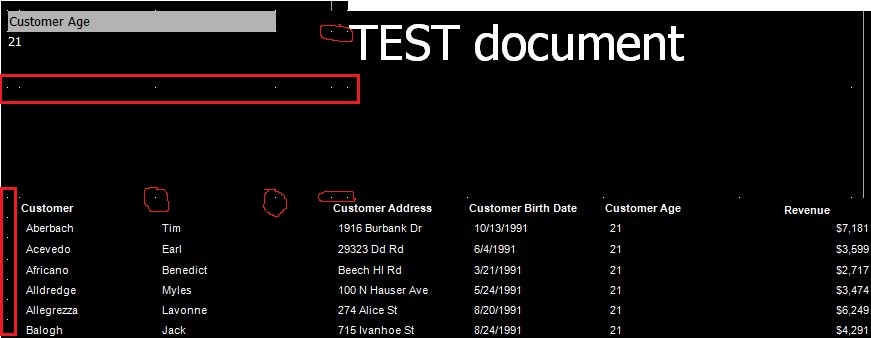
6.    Open the email in Outlook and notice that white dots display on the document:
ka04W000001MKjtQAG_0EM440000002HEw.jpeg

CAUSE:
It appears to specifically affect an email subscription with HTML format for the document that gets opened in Outlook in Strategy Web 9.4.1 Hotfix 4. This has been classified as a defect.
 
ACTION:   
Currently this issue is still being reviewed for feasibility by our Technology team and it is not scoped for any upcoming scheduled Strategy release.
 
WORKAROUND:
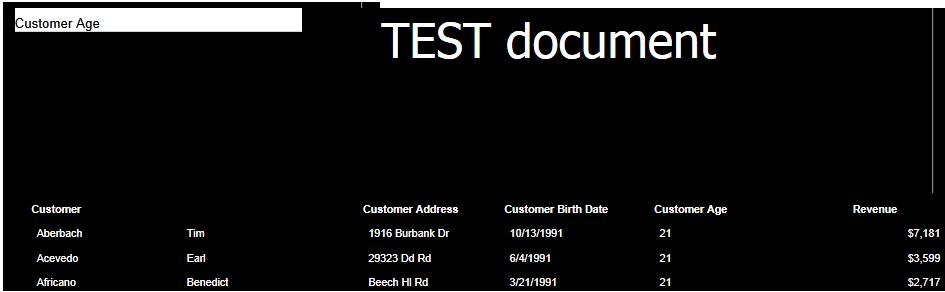
  1. There is no issue if the same document is opened in Outlook Web app, a browser-based email client. Access your Microsoft Exchange Server mailbox from a web browser, open the MSTR document and notice that there are no white dots appear on the document.  
ka04W000001MKjtQAG_0EM440000002HEu.jpeg

2. Instead of using, HTML format,  consider to use another delivery format such as PDF. The test showed that the document is displayed as expected, without white dots.
 
    
ADDITIONAL TROUBLESHOOTING:
If the steps above do not resolve the issue, please consider calling Strategy tech support with the following information of troubleshooting already done:

  • Results of testing the workarounds, provide  steps to reproduce the issue, an engineer will test to confirm if it is the same issue


Comment

0 comments

Details

Knowledge Article

Published:

April 11, 2017

Last Updated:

April 11, 2017