EducationSoftwareStrategy.com
StrategyCommunity

Knowledge Base

Product

Community

Knowledge Base

TopicsBrowse ArticlesDeveloper Zone

Product

Download SoftwareProduct DocumentationSecurity Hub

Education

Tutorial VideosSolution GalleryEducation courses

Community

GuidelinesGrandmastersEvents
x_social-icon_white.svglinkedin_social-icon_white.svg
Strategy logoCommunity

© Strategy Inc. All Rights Reserved.

LegalTerms of UsePrivacy Policy
  1. Home
  2. Topics

KB226970: Scroll bars do not work when running a report with locked Rows/Columns Headers in Internet Explorer 11 and MicroStrategy Web 9.4.1


Community Admin

• Strategy


Scroll bars do not work when running a report with locked Rows/Columns Headers in Internet Explorer 11 and MicroStrategy Web 9.4.1

SYMPTOM:
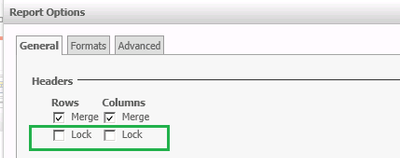
In Internet Explorer 11 and Strategy Web 9.4.1, Vertical and Horizontal Scroll bars do not work when running a report with locked Rows and Columns Header on the General tab in Report Options.

ka04W000001MKl5QAG_0EM4400000025nD.jpeg

CAUSE:
This is a known issue with Internet Explorer and Strategy Web 9.4.1.
 
WORKAROUND:
Run the report using a different Web browser (e.g. Firefox, Chrome).
In another way, disable the lock Rows and Columns Header on General tab in Report Options.
 Running report in Web  ->Tools -> Report Options
ka04W000001MKl5QAG_0EM4400000025n5.jpeg

ACTION:
The issue has been fixed in Strategy Web 9.4.1 HF2 and later as well as Strategy Web 10. Upgrade to these versions to take advantage of the fix.


Comment

0 comments

Details

Knowledge Article

Published:

April 10, 2017

Last Updated:

April 10, 2017