EducationSoftwareStrategy.com
StrategyCommunity

Knowledge Base

Product

Community

Knowledge Base

TopicsBrowse ArticlesDeveloper Zone

Product

Download SoftwareProduct DocumentationSecurity Hub

Education

Tutorial VideosSolution GalleryEducation courses

Community

GuidelinesGrandmastersEvents
x_social-icon_white.svglinkedin_social-icon_white.svg
Strategy logoCommunity

© Strategy Inc. All Rights Reserved.

LegalTerms of UsePrivacy Policy
  1. Home
  2. Topics

KB227008: How to switch between Crosstab or Tabular when import data in MicroStrategy Web 10.x


Community Admin

• Strategy


How to switch between Crosstab or Tabular when import data in MicroStrategy Web 10.x

In Strategy Web, it is possible to switch the import option between crosstabbed or tabular when import data from files.
 
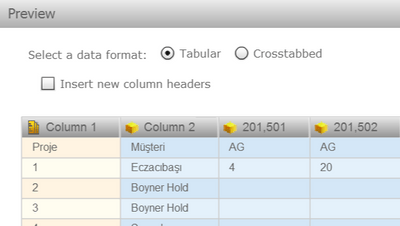
In Strategy Web 9, user sees below screen after upload files in preview page:
ka04W000000ObdyQAC_0EM4400000025i5.jpeg

 
In Strategy 10, the new Multiple Database Data Import preview page is introduced, the option to switch between tabular and crosstabbed is included in a new page named "Parse". Follow below steps to use this function:
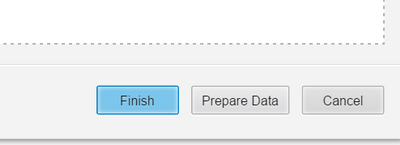
1. After select file, click "Prepare Data" to go to the data preview window:
ka04W000000ObdyQAC_0EM4400000025i7.jpeg

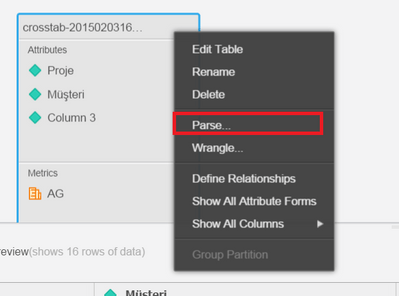
2. In the data preview window, click the down arrow for the table, choose "Parse":
ka04W000000ObdyQAC_0EM4400000025iI.jpeg

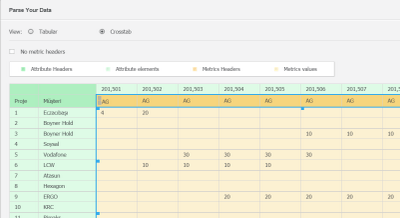
3. In the Parse Your Data window, the option to choose crosstabbed or tabular should be available:
ka04W000000ObdyQAC_0EM4400000025iH.jpeg

Comment

0 comments

Details

Knowledge Article

Published:

May 19, 2017

Last Updated:

May 19, 2017