EducationSoftwareStrategy.com
StrategyCommunity

Knowledge Base

Product

Community

Knowledge Base

TopicsBrowse ArticlesDeveloper Zone

Product

Download SoftwareProduct DocumentationSecurity Hub

Education

Tutorial VideosSolution GalleryEducation courses

Community

GuidelinesGrandmastersEvents
x_social-icon_white.svglinkedin_social-icon_white.svg
Strategy logoCommunity

© Strategy Inc. All Rights Reserved.

LegalTerms of UsePrivacy Policy
  1. Home
  2. Topics

KB227370: "Setup was unable to find a MicroStrategy Installation on your system." error message appears when installing R Integration Pack for UNIX/Linux on MicroStrategy Intelligence Server


Community Admin

• Strategy


"Setup was unable to find a MicroStrategy Installation on your system." error message appears when installing R Integration Pack for UNIX/Linux on MicroStrategy Intelligence Server.

SUMMARY
This technical note descibes the scenerio when a "Setup was unable to find a Strategy Installation on your system" error may be encountered when trying to install the R Integration Pack. This error can encountered if the vpd.properties or mstrinstalls.xml file cannot be found or is corrupted.
 
SYMPTOM
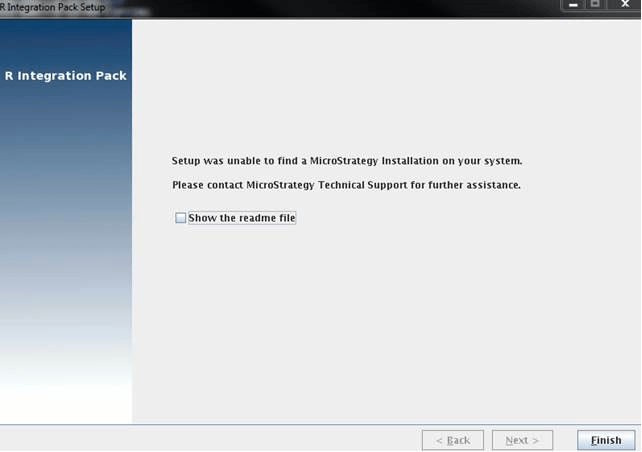
When installing the R Integration Pack for Linux on Strategy Intelligence Server 9.x and 10.x, the following message is received:
ka04W00000148rBQAQ_0EM4400000029GY.jpeg


Setup was unable to find a Strategy Installation on your system. Please contact Strategy Technical Support for further assistance.

CAUSE
When installing the R Integration Pack, the install looks for available instances of Strategy on the machine through the mstrinstalls.xml The above error message will appear if the install cannot find the files or if the files are corrupted. 
 
 
ACTION
For Strategy 9.x and 10.x, check if the mstrinstalls.xml file is located in the Home directory of the user who installed Strategy. If any vpd.properties files are located in this directory as well, they must be removed from this directory for R to find the mstrinstalls.xml file and the Strategy installation. Once all vpd.properties files are removed the installation of the R Integration Pack can proceed sucessfully. 


Comment

0 comments

Details

Knowledge Article

Published:

June 7, 2017

Last Updated:

June 7, 2017