SYMPTOM:
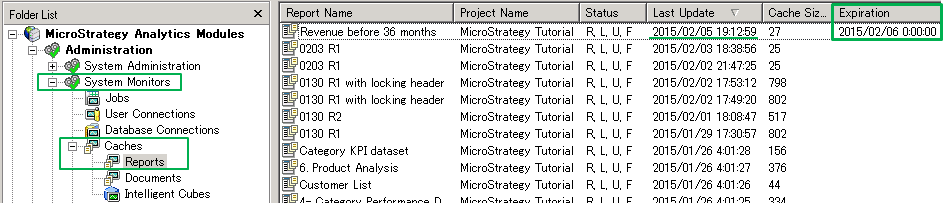
Users may see specific Reports Caches which are limited to an expiration time of "0:00:00" the next day (within 24 hours) in the Report Cache Monitor under System Monitors:
CAUSE:
This behavior is based on filters that use Dynamic Dates.
For instance, this sample report’s filter is as below:
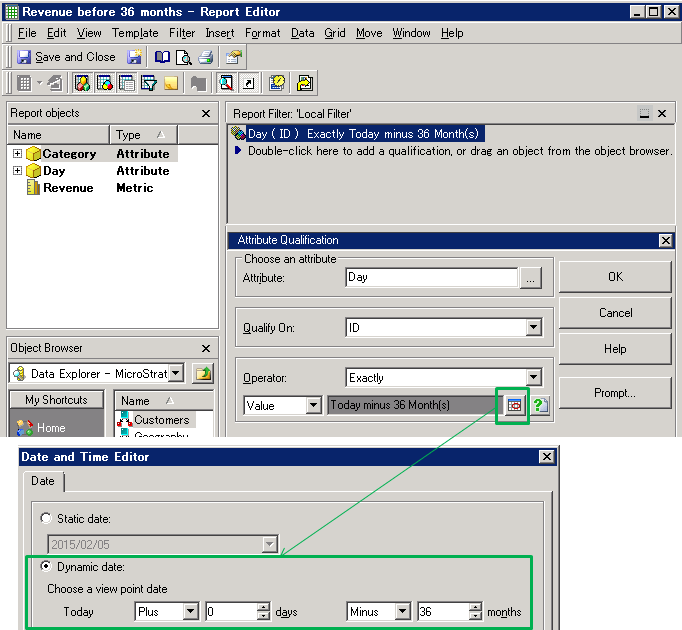
If this report is executed on 5th February, the cache for this report expires at “0:00:00” on 6th February, as in the first screenshot above. This behavior means, if a user executes the same report on 6th February, they are expected to see the data based on 6th February. Report Caches are applied to have this expiration logic by default.
WORKAROUND:
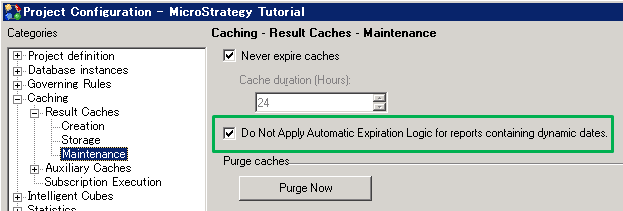
To change this behavior, users can enable the following option on Developer:
Project Configuration >Caching >Result Caches >Maintenance
> Check “Do not apply automatic expiration logic for reports containing dynamic dates”
NOTE:
For more information on Cache duration and relating to dynamic dates, see the Improving Report and Document Response Time chapter in the System Administration Guide.
For more information on Dynamic Dates filters, see the Advanced Filters chapter in the Advanced Reporting Guide.
RELATED TECHNICAL NOTES:
KB4328: How to create dynamic dates using MicroStrategy Desktop 8.x
