EducationSoftwareStrategy.com
StrategyCommunity

Knowledge Base

Product

Community

Knowledge Base

TopicsBrowse ArticlesDeveloper Zone

Product

Download SoftwareProduct DocumentationSecurity Hub

Education

Tutorial VideosSolution GalleryEducation courses

Community

GuidelinesGrandmastersEvents
x_social-icon_white.svglinkedin_social-icon_white.svg
Strategy logoCommunity

© Strategy Inc. All Rights Reserved.

LegalTerms of UsePrivacy Policy
  1. Home
  2. Topics

KB227547: "Please check that the cache configuration is proper and that the history list directory as specified in the server definition exists on the Intelligence Server machine." message received when executing a Document in MicroStrategy Web 10.x


Community Admin

• Strategy


This technical note describes a situation when there "MsiUserInBox: Failed to persist the results of this message. Please check that the cache configuration is proper and that the history list directory as specified in the server definition exists on the Intelligence Server machine." error is encountered due to the cache storage path being incorrect.

SUMMARY
This technical note describes a situation when there "MsiUserInBox: Failed to persist the results of this message. Please check that the cache configuration is proper and that the history list directory as specified in the server definition exists on the Intelligence Server machine." error is encountered due to the cache storage path being incorrect.
 
SYMPTOM
When executing a Report Services Document in Strategy Web 10.x and using a database based History List the following message is received:

ka04W000001MKr9QAG_0EM4400000029Gb.jpeg


MsiUserInBox: Failed to persist the results of this message. Please check that the cache configuration is proper and that the history list directory as specified in the server definition exists on the Intelligence Server machine.

CAUSE
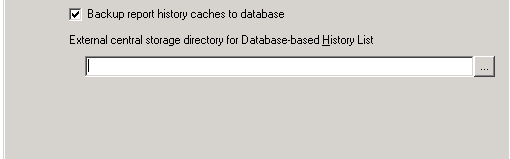
One cause for this issue is the cache storage location configured in the Project Configuration or the History List external central storage directory for Database Based History List location in the Intelligence Server configuration is set to a path that does not exist on the Intelligence Server machine or the directories are not accessible to the user running the Intelligence Server.
 
ACTION
To resolve the issue navigate to Project Configuration > Caching > Storage and verify the path entered exists on the Intelligence Server machine and is accessible by the user running the Intelligence Server.
 

ka04W000001MKr9QAG_0EM4400000029GW.jpeg


Also, navigate to Intelligence Server Configuration > History Settings and verify the path entered exists on the Intelligence Server machine and is accessible by the user running the Intelligence Server.
 

ka04W000001MKr9QAG_0EM4400000029GZ.jpeg

Comment

0 comments

Details

Knowledge Article

Published:

April 5, 2017

Last Updated:

April 5, 2017