Summary
Strategy Security Filters are normally created in Strategy Developer. However, an administrator may want to do this automatically using the Strategy Web API.
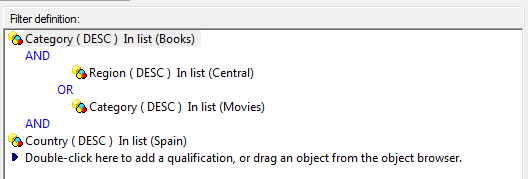
Example
This can be done using Strategy Web SDK. The following standalone code demonstrates this:
public class CreateSecurityFilterWithWebObjects {
    public static WebIServerSession sessionInfo;
    public static final String filterName = "New SecurityFilter for User Manager Demo";
    public static final String iServerName = "localhost";
    public static final String projectName = "Strategy Tutorial";
    public static final String adminLoginName = "administrator";
    public static final String adminLoginPasswd = "";

    public static void main(String[] args) {
        sessionInfo = getServerSession(iServerName, projectName, adminLoginName, adminLoginPasswd);

        WebObjectSource source = sessionInfo.getFactory().getObjectSource();
        WebMDSecurityFilter sFilter = (WebMDSecurityFilter)source.getNewObject(EnumDSSXMLObjectTypes.DssXmlTypeMDSecurityFilter);

        try {
            WebExpression exp = sFilter.getExpression();
            exp.createNode("Category@DESC in(\"Books\")");

            WebNode n2 = exp.createOperatorNode(
                    EnumDSSXMLExpressionType.DssXmlFilterBranchQual,
                    EnumDSSXMLFunction.DssXmlFunctionOr);

            exp.createNode("Region@DESC in(\"Central\")", n2);
            exp.createNode("Category@DESC in(\"Movies\")", n2);
            exp.createNode("Country@DESC in(\"Spain\")");

            String folderID = source.getFolderID(EnumDSSXMLFolderNames.DssXmlFolderNameSystemMDSecurityFilters);

            // Get a folder object using the folder where sec filters are stored
            WebFolder folder = (WebFolder) source.getObject(folderID, EnumDSSXMLObjectTypes.DssXmlTypeFolder);

            // Create a new security filter
            source.saveAs(sFilter, filterName, folder, true);

        } catch (WebObjectsException webObjEx) {
            System.out.println("Error fetching object definition or fetching elements from an attribute: " + webObjEx.getMessage());

        }
    }

    public static WebIServerSession getServerSession(String serverName, String Project, String loginName, String password) {
        WebIServerSession sessionInfo = null;
        try {
            WebObjectsFactory woFact = WebObjectsFactory.getInstance();
            sessionInfo = woFact.getIServerSession();
            sessionInfo.setServerName(serverName);
            sessionInfo.setProjectName(Project);
            sessionInfo.setLogin(loginName);
            sessionInfo.setPassword(password);
            sessionInfo.setApplicationType(EnumDSSXMLApplicationType.DssXmlApplicationCustomApp);

            // Create a new session
            sessionInfo.getSessionID();

        } catch (WebObjectsException ex) {
            System.out.println("Error creating a session");
        }
        return sessionInfo;
    }
}