EducationSoftwareStrategy.com
StrategyCommunity

Knowledge Base

Product

Community

Knowledge Base

TopicsBrowse ArticlesDeveloper Zone

Product

Download SoftwareProduct DocumentationSecurity Hub

Education

Tutorial VideosSolution GalleryEducation courses

Community

GuidelinesGrandmastersEvents
x_social-icon_white.svglinkedin_social-icon_white.svg
Strategy logoCommunity

© Strategy Inc. All Rights Reserved.

LegalTerms of UsePrivacy Policy
  1. Home
  2. Topics

KB228175: Character string "&" is converted to "&" when exporting to Excel in MicroStrategy 9.4.1


Community Admin

• Strategy


This article describes a known issue that occurs when exporting to Excel in MicroStrategy 9.4.1. The scope of this issue is limited to situations where the string "&" is contained in an attribute element name or column name in a report that is exported to Excel. This issue can occur when exporting from both Developer and Web.

SUMMARY:
This article describes a known issue that occurs when exporting to Excel in Strategy 9.4.1. The scope of this issue is limited to situations where the string "&" is contained in an attribute element name or column name in a report that is exported to Excel. This issue can occur when exporting from both Developer and Web.
 
SYMPTOM:
In some situations, the string "&" may be contained in an attribute element, attribute column name, or metric column name. This string is standard HTML code for the ampersand symbol, "&". When a report containing the string "&" is exported to Excel with a particular combination of export settings, and this string will automatically be converted to just the ampersand symbol "&" on the exported spreadsheet. For example, an attribute element named "North & East" would be converted to "North & East" in the exported Excel spreadsheet.
 
STEPS TO REPRODUCE:
  • In Strategy 9.4.1, open the Tutorial project and open Project Configuration. In the menu Project definition > Export Settings, make sure the option "Run Export to Excel/Word in 8.1.x compatibility mode" is NOT selected.
     
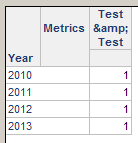
  • Create a new report in the Tutorial project and put any attribute on the report such as year. Create a derived metric titled "Test & Test" with any definition, such as Sum(1){}. The resulting report will look like the following.
ka04W000000OdYhQAK_0EM440000002C8w.jpeg
  • Export the report to Excel. The title of the derived metric will now be "Test & Test" as shown in the following:
ka04W000000OdYhQAK_0EM440000002C8t.jpeg
  • In Web, the behavior is similar, though the setting is labeled differently. In the Preferences menu, select Export Reports and then change the Excel version to "Excel 2007 or newer versions".
     
  • Export the same report to Excel from Web. The string "&" will be converted to an ampersand "&" on the exported Excel spreadsheet.

 
CAUSE:
This is a known issue in Strategy Developer and Web 9.4.1. 
 
ACTION:
Currently this issue is still being reviewed for feasibility by our Technology team and it is not scoped for any upcoming scheduled Strategy release.
 
WORKAROUND:
Changing the export settings in Developer or Excel causes the string "&" to be exported to Excel correctly.  In Developer in the Project Configuration menu select Project definition > Export Settings. Select the option "Run Export to Excel/Word in 8.1.x compatibility mode".
 
In Web in the Preferences menu, select Export Reports and then change the Excel version to "Excel XP/2003".
 
The internal reference number for the issue described in this technical note is 1011709.


Comment

0 comments

Details

Knowledge Article

Published:

April 10, 2017

Last Updated:

April 10, 2017