SUMMARY
This technical note describes an issue where the version of the Access file containing the Enterprise Manager project in Strategy 9.5.0 is not updated to version 9.5.0 and results in an error during initialization.
SYMPTOM
An error message is received when configuring a new Enterprise Manager project in Strategy Enterprise Manager 9.5.0
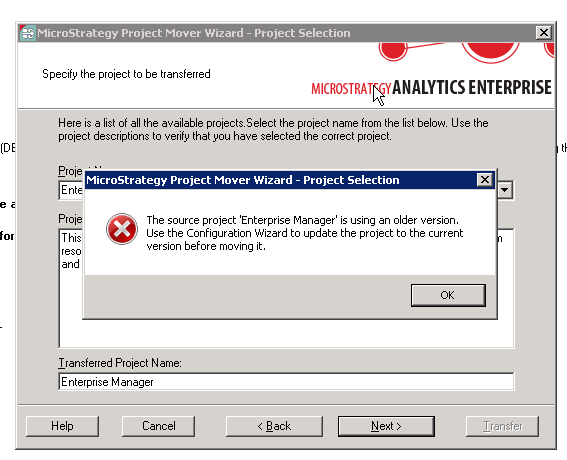
The source project 'Enterprise Manager' is using an older version. Use the Configuration Wizard to update the project to the current version before moving it
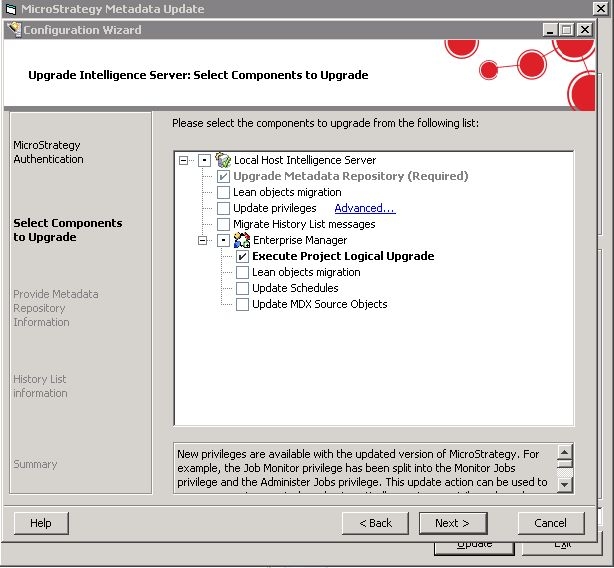
11) Modify the ExtendedAnsiSQL and MaxBufferSize advanced settings in the ODBC Administrator as per KB20459 and click "Ok" in the popup window.
12) Click "Finish" to start the Upgrade process.
Once the process has been completed, the Enterprise Manager 9.5 (9s) Metadata file should be already upgraded and the project transfer in the Enterprise Manager Console Initialization should no longer display an error message.
The Intelligence Server can now be pointed to any desired Metadata by using Configuration Wizard.
Option 2: Upgrade using Strategy MDUpdateUtil Tool
1) Create a DSN that connects to the Strategy 9.5 (9s) out of the box Enterprise Manager Metadata. This is a Microsoft Access file called "EM_Proj_MD.mdb" and located at: "<install_drive>:\Program Files (x86)\Strategy\Enterprise Manager".
2) Navigate to the "EM_Proj_MD.mdb". Right click on it and select "properties". Uncheck the option for "Read Only" and click "Ok".
3) Open Strategy Developer and create a 2-tier Project Source to connect to the Enterprise Manager Metadata using the DSN created in Step 1.
4) Run the Strategy MDUpdateUtil Tool. This can be found under: "<install_drive>:\Program Files (x86)\Common Files\Strategy"
5) Select the name of the Project Source created in Step 3 from the drop down list and click "Next>>>".
6) Check the following upgrade options and click "Update":
- Update System Objects and Translations (in both Configuration and Projects Sections).
- Update Report and Document Definitions (in Projects Section only)
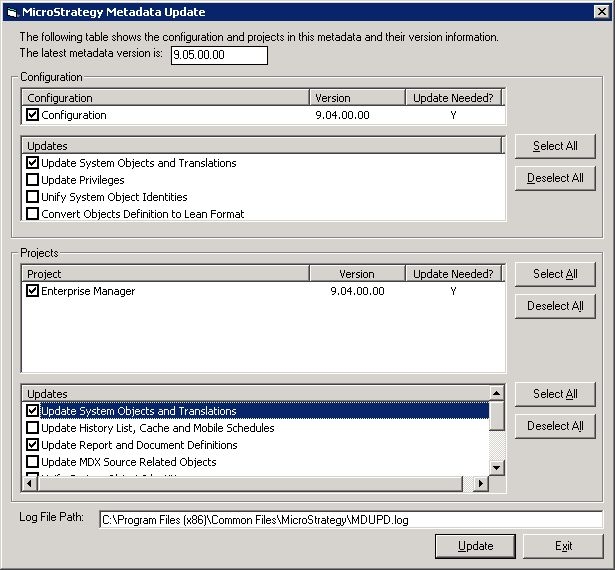
7) Once the upgrade process has been completed, close all widows and exit the Strategy MDUpdateUtil Tool.
At this point, the Enterprise Metadata 9.5 (9s) Metadata file should be already upgraded and the project transfer in the Enterprise Manager Console Initialization should no longer display an error message.
Option 3: Contact Strategy Technical Support
It is possible to contact Strategy Technical Support to request an upgraded version of the Enterprise Manager 9.5 (9s) Metadata file. Contact Strategy Technical Support to get a copy of the upgraded Enterprise Manager 9.5 (9s) Metadata.
The Strategy Internal Reference Number for the issue discussed in this technical note is 1014426.
