SYMPTOM
In Strategy 10.3, users are sometimes not able to create a Visual Insight dashboard based directly on a cube created from imported data. They following error is displayed:
Internal Error: DSSDocumentDataPreparationTask::Run(): Error evaluate views info, job 35865, Error Code=-2147467259

ACTION
Ensure that the relationships are correctly defined at the time of the data import. This behaviour may be caused by auto-detected relations. If necessary, delete the auto-managed relationships or change them to user-managed.

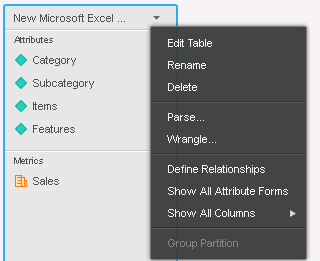
It is possible to define relationships between attributes on the Preview page. Hover the cursor over the name of a table, click the Menu icon, and select Define Relationships. The Define Relationships dialog box opens.
Relationships can be set as user-manged or auto-managed:
• Auto-managed : This is the default relationship management type when importing new data. Strategy manages the relationships according to how elements and attributes relationship types are set. If an attribute does not match the relationship criteria that is set, Strategy automatically deletes the attribute. This eliminates duplicate attributes in your dataset.
• User-managed : This relationship management type allows a user to oversee and manage the relationships between attributes and elements. This is recommended for advanced analysts who are comfortable with Project attributes, as Strategy does not automatically managed the imported datasets.
For more details, please refer to Strategy Web Help:
http://www2.microstrategy.com/producthelp/10.4/WebUser/WebHelp/Lang_1033/Content/attribute_relationships.htm 230001
