EducationSoftwareStrategy.com
StrategyCommunity

Knowledge Base

Product

Community

Knowledge Base

TopicsBrowse ArticlesDeveloper Zone

Product

Download SoftwareProduct DocumentationSecurity Hub

Education

Tutorial VideosSolution GalleryEducation courses

Community

GuidelinesGrandmastersEvents
x_social-icon_white.svglinkedin_social-icon_white.svg
Strategy logoCommunity

© Strategy Inc. All Rights Reserved.

LegalTerms of UsePrivacy Policy
  1. Home
  2. Topics

KB230246: "Shared Reports" folder is not visible in MicroStrategy Web though the user has the correct permissions to see it


Community Admin

• Strategy


This article documents a behavior reported in Microstrategy Web, where the Shared Reports folder is not visible even though the user has the correct permissions to see it. One of the possible cause for this issue is that project status is created in HTML format and there is a syntax error in one of the HTML tags.

SUMMARY:
This technical note documents a behavior reported in Strategy Web 9.4.1, where the Shared Reports folder is not visible even though the user has the correct permissions to see it.
 
SYMPTOM:
The Shared Reports folder for a project is not exposed in Strategy Web 9.4.1. However, the folder can be accessed from the left hand-side menu, as shown below:
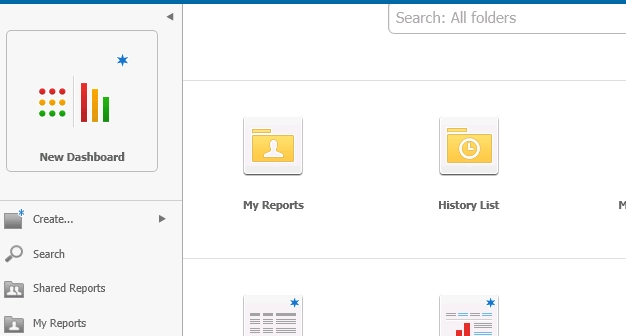
 

ka04W000000Oe8nQAC_0EM4400000025mL.jpeg

 
Furthermore, the project status is not displayed either even though it has been set up.
 
CAUSE:
One of the possible cause for this issue is that project status is created in HTML format and there is a syntax error in one of the HTML tags.
 
ACTION:
Review the HTML created to display the Project Status and ensure the syntax is correct.


Comment

0 comments

Details

Knowledge Article

Published:

June 13, 2017

Last Updated:

June 13, 2017