EducationSoftwareStrategy.com
StrategyCommunity

Knowledge Base

Product

Community

Knowledge Base

TopicsBrowse ArticlesDeveloper Zone

Product

Download SoftwareProduct DocumentationSecurity Hub

Education

Tutorial VideosSolution GalleryEducation courses

Community

GuidelinesGrandmastersEvents
x_social-icon_white.svglinkedin_social-icon_white.svg
Strategy logoCommunity

© Strategy Inc. All Rights Reserved.

LegalTerms of UsePrivacy Policy
  1. Home
  2. Topics

KB230437: The Total option of element selector is displayed in English when running a Report Services document in Flash mode and the preference language is set to Chinese with MicroStrategy Web


Community Admin

• Strategy


The Total option of element selector is displayed in English when running a Report Services document in Flash mode and the preference language is set to Chinese with MicroStrategy Web 9.4.1

SYMPTOM: 
In Strategy Web 9.4.1, the Total option of element selector is displayed in English when running a Report Services document in Flash mode and the preference language is set to Chinese.
 
STEPS TO REPRODUCE:
  • In Strategy Web, create a report with the attribute Month.
  • Convert the report to a Report Services document.
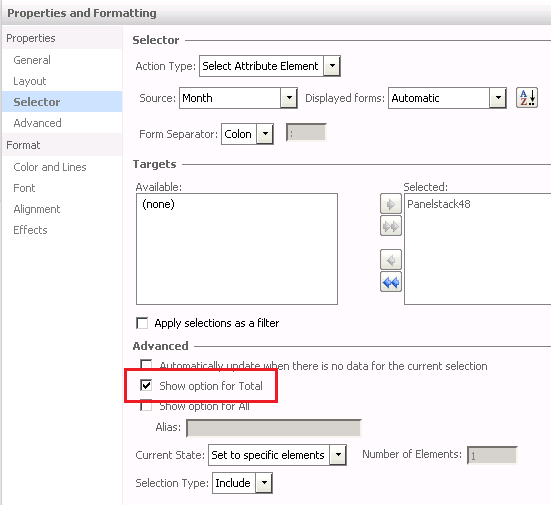
  • Add a Listbox selector based on the attribute Month, edit the selector properties, enable "Show option for Total", as shown below:
ka04W000000Og3aQAC_0EM4400000025ml.jpeg
  • Insert a panelstack and add a dynamic text with the attribute Month to the panel. Make the panelstack as the target of the above selector.
  • Save the document.
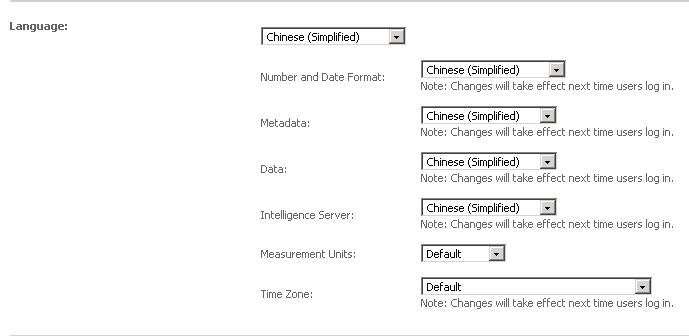
  • Go to Preferences > Project Defaults, set all the lanuage options to "Chinese(Simplified)", as shown below:
ka04W000000Og3aQAC_0EM4400000025mf.jpeg
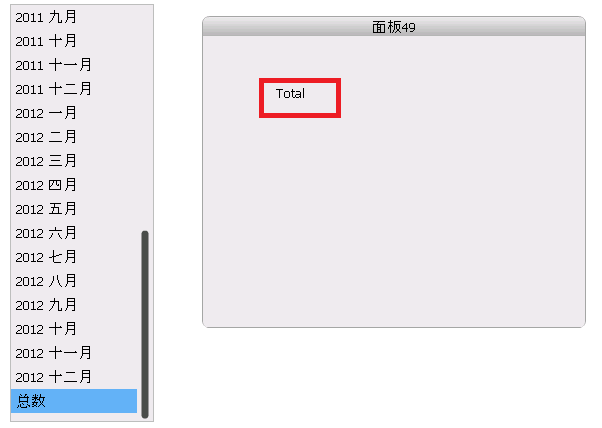
  • Run the document in Flash mode, note that when Total is selected on the selector, the corresponding dynamic text is displayed in English, as shown below:
ka04W000000Og3aQAC_0EM4400000025mj.jpeg

 
CAUSE: 
This is a known issue with Strategy Web 9.4.1.
 
ACTION: 
This issue has been fixed in Strategy Web 9.4.1 HF 8. Please upgrade to this version to take advantage of the fix.


Comment

0 comments

Details

Knowledge Article

Published:

June 30, 2017

Last Updated:

June 30, 2017