EducationSoftwareStrategy.com
StrategyCommunity

Knowledge Base

Product

Community

Knowledge Base

TopicsBrowse ArticlesDeveloper Zone

Product

Download SoftwareProduct DocumentationSecurity Hub

Education

Tutorial VideosSolution GalleryEducation courses

Community

GuidelinesGrandmastersEvents
x_social-icon_white.svglinkedin_social-icon_white.svg
Strategy logoCommunity

© Strategy Inc. All Rights Reserved.

LegalTerms of UsePrivacy Policy
  1. Home
  2. Topics

KB231060: Usher QR code is displayed on MicroStrategy Login page when Intelligence Server is not available using MicroStrategy Web 9.4.1 HF6 or above.


Community Admin

• Strategy


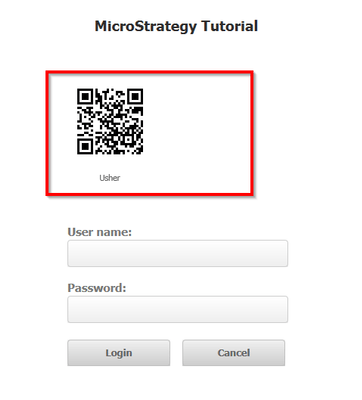
Users see an Usher QR code on the login page when attempted to log into MicroStrategy Web after the connected Intelligence Server shut down.

SYMPTOM:
Users see an Usher QR code on the login page when attempted to log into Strategy Web, like shown below: 
ka04W000000OhJeQAK_0EM4400000025hS.jpeg

 
CAUSE:
This is a known issue with Strategy web 9.4.1 HF6 and above. This issue may occur if the login page is refreshed after connecting to an Intelligence Server that has been shutdown, or if a user attempts to execute a URL API command containing an &Server parameter populated with a value of an Intelligence Server that does not exist or is unreachable.
 
ACTION:
This issue has been fixed in Strategy Web 10.1. Take advantage of upgrading for a fix.
 
The internal reference to this issue is 867751.


Comment

0 comments

Details

Knowledge Article

Published:

May 25, 2017

Last Updated:

May 25, 2017