EducationSoftwareStrategy.com
StrategyCommunity

Knowledge Base

Product

Community

Knowledge Base

TopicsBrowse ArticlesDeveloper Zone

Product

Download SoftwareProduct DocumentationSecurity Hub

Education

Tutorial VideosSolution GalleryEducation courses

Community

GuidelinesGrandmastersEvents
x_social-icon_white.svglinkedin_social-icon_white.svg
Strategy logoCommunity

© Strategy Inc. All Rights Reserved.

LegalTerms of UsePrivacy Policy
  1. Home
  2. Topics

KB231225: "Object with ID '5FF2A9F1A45143FD8F4A3B4B2FE14415' and type 8 (Folder) is not found in metadata. It may have been deleted." error returned when trying to add objects into a project package in MicroStrategy Object Manager 9.4.1


Community Admin

• Strategy


SUMMARY

This techincal note outlines an issue when trying to add objects into a package via the Add button in the Import Package window in Strategy Object Manager. The object ID might differ however the cause is the same.
SYMPTOMS
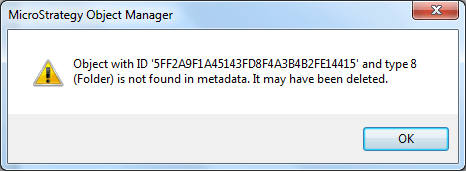
When adding objects to a package in the Import Package wizard by hitting the Add button in Strategy Object Manager, the following error is returned:
 

ka04W000000OfnYQAS_0EM440000002C8T.jpeg


Object with ID '5FF2A9F1A45143FD8F4A3B4B2FE14415' and type 8 (Folder) is not found in metadata. It may have been deleted.

 
The particular object ID in the error messages corresponds to the Searches folder, however this can apply to other folder objects in the Public Objects folder.
CAUSE:
This is a known issue in Strategy Object Manager 9.4.1.
 

ACTION

Contact Strategy Technical Support for further assistance with this issue.
 

WORKAROUND

Drag the objects needed for the package from the main Strategy Object Manager window and drop them in the Import Package wizard.


Comment

0 comments

Details

Knowledge Article

Published:

April 7, 2017

Last Updated:

July 21, 2017