SUMMARY:
This technical note describes the issue found in Strategy Web 9.3.1, 9.4.1, 9.5.x, and 10.x where users are not able to perform a column merge in a Visual Insight dashboard when an attribute has more than two attribute forms and more than two metrics in a grid column. This issue has been classified as a defect by Strategy. There is a workaround available for this issue. Currently this issue is still being reviewed for feasibility by our Technology team and it is not scoped for any upcoming scheduled Strategy release.
SYMPTOM:
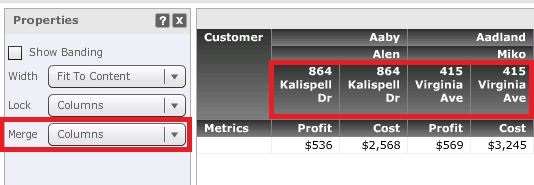
In Visual Insight, a user places an attribute with three (or more) attribute forms and two (or more) metrics to a column and notices that only two first attribute forms are merged while third one is not in Strategy Web 9.3.1, 9.4.1, 9.5.x, and 10.x in spite of column merge setting in the Properties as shown below:
STEPS TO REPRODUCE:
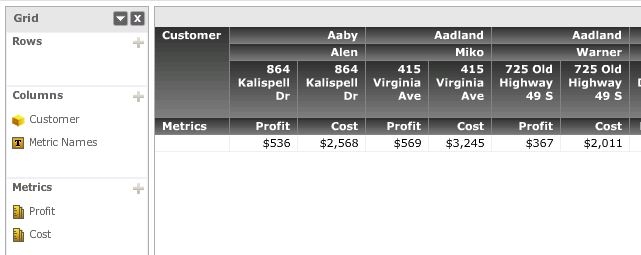
4. Notice that First Name and Last Name attribute forms are merged while merging is not applied for third one, Address attribute form, it is repeated for each metric.
Note: The issue does not occur in a report and Report Services document. The issue is specific to Visual Insight dashboard.
CAUSE:
It appears to specifically affect Visual Insight dashboards where an attribute with three or more attribute forms and several metrics placed to columns in a grid in Strategy 9.3.1, 9.4.1, 9.5.x, and 10.x. This has been classified as a defect.
ACTION
Currently this issue is still being reviewed for feasibility by our Technology team and it is not scoped for any upcoming scheduled Strategy release
WORKAROUND
Issue will not occur if user answers the prompt and runs the report after drill to the prompted template. It only occurs when user hits back button without answering the prompt.
The Strategy Internal Reference Number for the issue discussed in this technical note is 997030
