EducationSoftwareStrategy.com
StrategyCommunity

Knowledge Base

Product

Community

Knowledge Base

TopicsBrowse ArticlesDeveloper Zone

Product

Download SoftwareProduct DocumentationSecurity Hub

Education

Tutorial VideosSolution GalleryEducation courses

Community

GuidelinesGrandmastersEvents
x_social-icon_white.svglinkedin_social-icon_white.svg
Strategy logoCommunity

© Strategy Inc. All Rights Reserved.

LegalTerms of UsePrivacy Policy
  1. Home
  2. Topics

KB231538: "Allow Smart Metric" option is reset when the metric expression is changed in MicroStrategy Command Manager 9.4.1


Community Admin

• Strategy


This document shows a known issue that "Allow Smart Metric" option would be reset if the metric expression is changed in MicroStrategy Command Manager 9.4.1. One workaround is to add "ALLOWSMARTMETRIC LEAVEASITIS" in the outline. 

SUMMARY:
This document shows a known issue that "Allow Smart Metric" option would be reset if the metric expression is changed in Strategy Command Manager  9.4.1. One workaround is to add "ALLOWSMARTMETRIC LEAVEASITIS" in the outline. 
 
SYMPTOM:
"Allow Smart Metric" option would be reset if the metric expression is changed in Strategy Command Manager 9.4.1.
 
STEPS TO REPRODUCE:
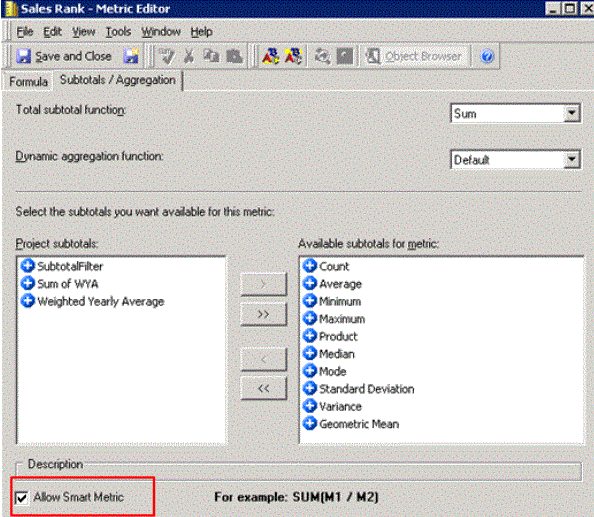
      • In Strategy Tutorial project, edit metric Sales Rank and check "Allow Smart Metric" option to make it a smart metric:
ka04W000000OebfQAC_0EM440000002C5T.jpeg
      • Run outline below in Command Manager to change the expression:
         
        
        ALTER METRIC "Sales Rank" EXPRESSION "Rank([\Public Objects\Metrics\Sales Metrics\Cost])" IN FOLDER "\Public Objects\Metrics\Sales Metrics" FOR PROJECT "Strategy Tutorial";
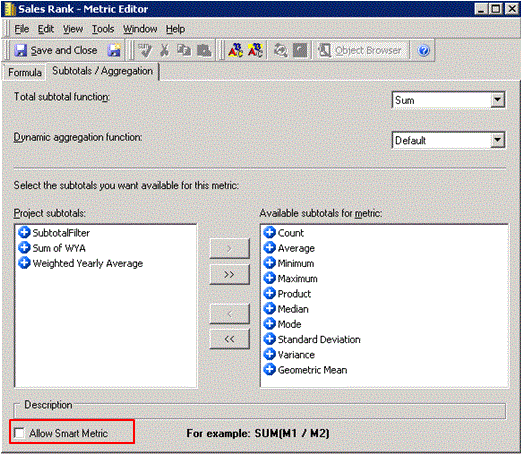
      • The outline above is supposed to change the expression only. But, "Allow Smart Metric" option is reset to be unchecked as shown below:
ka04W000000OebfQAC_0EM440000002C5N.jpeg

 
CAUSE:
This is a known issue in Strategy Command Manager 9.4.1.
 
ACTION:
Contact Strategy Technical Support for the latest update on this issue.
 
WORKAROUND:
Add "ALLOWSMARTMETRIC LEAVEASITIS" in the outline as shown below:


ALTER METRIC "Sales Rank" EXPRESSION "Rank([\Public Objects\Metrics\Sales Metrics\Cost])" ALLOWSMARTMETRIC LEAVEASITIS IN FOLDER "\Public Objects\Metrics\Sales Metrics" FOR PROJECT "Strategy Tutorial";

 
The Strategy Internal Reference Number for the issue discussed in this technical note is 1014658.


Comment

0 comments

Details

Knowledge Article

Published:

June 8, 2017

Last Updated:

June 8, 2017