EducationSoftwareStrategy.com
StrategyCommunity

Knowledge Base

Product

Community

Knowledge Base

TopicsBrowse ArticlesDeveloper Zone

Product

Download SoftwareProduct DocumentationSecurity Hub

Education

Tutorial VideosSolution GalleryEducation courses

Community

GuidelinesGrandmastersEvents
x_social-icon_white.svglinkedin_social-icon_white.svg
Strategy logoCommunity

© Strategy Inc. All Rights Reserved.

LegalTerms of UsePrivacy Policy
  1. Home
  2. Topics

KB231781: "More than one address with name 'XXX' were found for user 'XXX'" error message appears when attempting to remove address in MicroStrategy Command Manager 9.4.1


Community Admin

• Strategy


This document shows a known issue where "More than one address with name 'XXX' were found for user 'XXX'" error message would appear when attempting to remove one of the address objects which have same object names but different delivery type. 

SUMMARY:
This document shows a known issue where "More than one address with name 'XXX' were found for user 'XXX'" error message would appear when attempting to remove one of the address objects which have same object names but different delivery type. 
 
SYMPTOM:
It is allowed to create two address objects with same object name but different delivery type in Strategy Command Manager 9.4.1. But, "More than one address with name 'XXX' were found for user 'XXX'" error message would appear when attempting to remove one of address objects.
 
STEPS TO REPRODUCE:

  • Run outlines below to create two address objects with same name "a1" but different delivery type in Strategy Command Manager:
    
    ADD ADDRESS "a1" PHYSICALADDRESS "a@a.com" DELIVERYTYPE EMAIL DEVICE "Microsoft Outlook" TO USER "administrator";
    ADD ADDRESS "a1" PHYSICALADDRESS "a@a.com" DELIVERYTYPE FILE DEVICE "USER selected LOCATION" TO USER "administrator";
    REMOVE ADDRESS "a1" FROM USER "administrator";
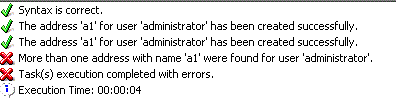
  • Error message would appear as shown below:
       
ka04W000000OgsTQAS_0EM440000002C8V.jpeg
  • 
    More than one address with name 'a1' were found for user 'administrator'

 
CAUSE:
This is a known issue in Strategy Command Manager 9.4.1.
 
ACTION:
Contact Strategy Technical Support for the latest update on this issue. 
 
The Strategy Internal Reference Number for the issue discussed in this technical note is 996840.


Comment

0 comments

Details

Knowledge Article

Published:

June 8, 2017

Last Updated:

June 8, 2017