EducationSoftwareStrategy.com
StrategyCommunity

Knowledge Base

Product

Community

Knowledge Base

TopicsBrowse ArticlesDeveloper Zone

Product

Download SoftwareProduct DocumentationSecurity Hub

Education

Tutorial VideosSolution GalleryEducation courses

Community

GuidelinesGrandmastersEvents
x_social-icon_white.svglinkedin_social-icon_white.svg
Strategy logoCommunity

© Strategy Inc. All Rights Reserved.

LegalTerms of UsePrivacy Policy
  1. Home
  2. Topics

KB232030: “Convert to Document” option in Visual Insight dashboards cannot be removed without disabling “Web run document” privilege in MicroStrategy Web 9.4.1


Community Admin

• Strategy


This technical note describes the defect found in MicroStrategy Web 9.4.1 where a user is not able to remove “Convert to document” option in Visual Insight dashboards without disabling the “Web Run Document” privilege. There is no workaround found for this issue.  It has been scoped for a future release. 

SYMPTOM:
In Strategy Web 9.4.1, a user creates a Visual Insight dashboard and wants to remove “Convert to document” option in order to prevent other users from a conversion by mistake. It is an irreversible alteration to the existing VI dashboard once a document is saved thus it could mean that the Visual Insight dashboard has to be re-built a second time, incurring development time and cost. It was found that the only way to remove this option is to disable “Web run document” privilege. It is not an acceptable solution as users need to be able to run other documents.
 
STEPS TO REPRODUCE:
  1. Create a user with the following privileges:
  • Web re-execute report against warehouse (Web Reporter privileges)
  • Web User (Web Reporter privileges)
  • Web Run Dashboard (Common Privileges)
  • Web Run Document (Common Privileges)
  1. Create a Visual Insight dashboard in Strategy Web
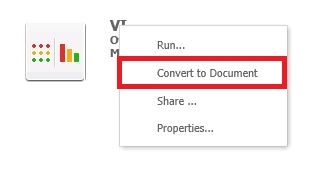
  2. Perform a right mouse click on the created VI dashboard, “Convert to Dashboard” option displays:
ka04W000000OdfvQAC_0EM4400000025kx.jpeg
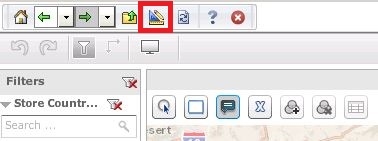
  1. Run the dashboard, Design icon displays as well that converts the dashboard to a document:


ka04W000000OdfvQAC_0EM4400000025lT.jpeg
  1. Remove “Web Run Document” privilege and test again
  2. “Convert to Document” option is no longer displayed:
ka04W000000OdfvQAC_0EM4400000025lJ.jpeg

7.   As well as the Design mode icon in Visual Insight:

ka04W000000OdfvQAC_0EM4400000025lR.jpeg


Disabling the “Web Run Document” privilege is not a solution as it prevents users from running any other documents in Strategy Web.
 
CAUSE:
The issue is specific to Strategy 9.4.1. This has been classified as a defect.
 
ACTION
This issue has been addressed with Strategy 10. Upgrade to take advantage of the fix.
 
 
The Strategy Internal Reference Number for the issue discussed in this technical note is 946876


Comment

0 comments

Details

Knowledge Article

Published:

April 6, 2017

Last Updated:

April 6, 2017