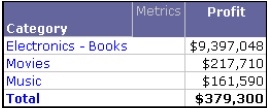
This technical note will describe how each of the three subtotal options of derived elements differs, using a sample report as shown below.
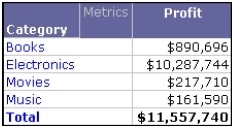
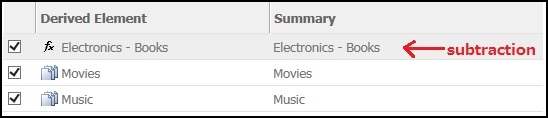
As an example, the derived element is defined as follows
[Option 1: Use this element when calculating subtotals]
The derived element values are applied to all subtotals. This means that a derived element’s aggregated data is applied to all subtotals for the report, rather than the values for the individual items that are part of a derived element.
[Option 2: Use the individual items that make up this element when calculating subtotals]
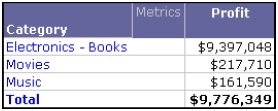
The values of the separate items that make up the derived element are applied to all subtotals. For Group and Filter derived elements, only attribute elements can be included as items of derived elements. Calculation derived elements can include attribute elements as well as other derived elements.
In the sample report, the derived element has been defined as Electronics – Books (subtraction). Applying the individual item values to the subtotal means that the subtotal uses the individual values of the Electronics and Books attribute elements, as shown below.
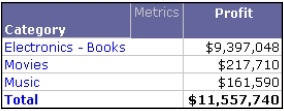
[Option 3: Do not use this element when calculating subtotals]
This option excludes the derived element values and separate item values from all subtotals.You can use this option to avoid double counting when an attribute element is included in more than one derived element.