SUMMARY
This Technical Note describes how the project level governing limit “Maximum RAM usage (MBytes)" for Intelligent Cubes is implemented in a clustered environment. This setting defines the amount of Intelligent Cube data that can store in Intelligence Server memory at one time for a project.
QUESTION
How does the "Maximum RAM usage (MBytes)" project level setting for Intelligent Cubes apply to a clustered environment?
ANSWER
The "Maximum RAM usage (MBytes)" setting limits the Cubes memory usage for each node of a cluster. For example, the Administrator of a three-node cluster sets this limit to 400 megabytes. The 400 megabytes are not shared by each node, rather each node is allotted 400 megabytes for Intelligent Cube data for that specific project.
This is an important concept, as a misunderstanding of this could cause an Administrator to enter a value that they find appropriate for the entire cluster. In the event that the entered value exceeds the machine’s available RAM, then the limit will automatically reset to the default value, 256 megabytes.
In order to set this limit, log on to Strategy Desktop/Developer, right click on the desired project, and select “Project Configuration…”

Navigate to Intelligent Cubes >> General, and enter your desired limit.
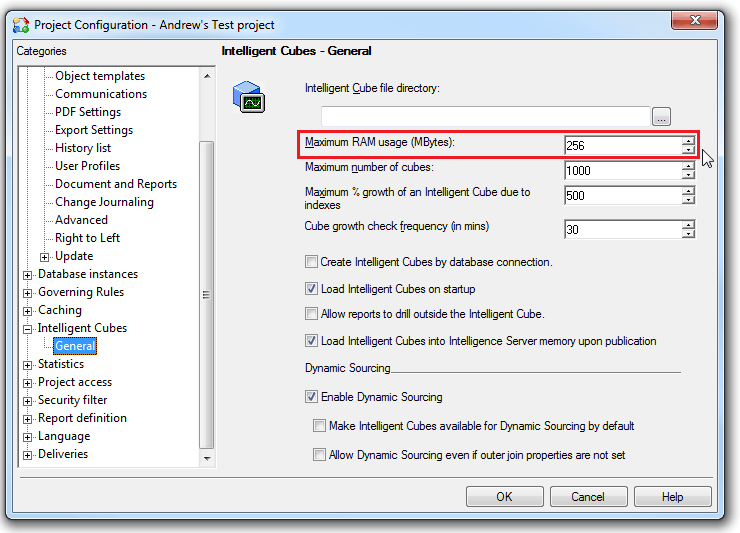
By default this is set to 256 megabytes.
After setting the Maximum RAM limit, an Intelligence Server restart is required to take effect.
