KB233155
Summary:
This Technical Note describes the steps to schedule periodic Enterprise maintenance tasks. This functionality is only available in Enterprise Manager Console, and requires that the Enterprise Manager Console be installed. These steps are limited to Strategy 9.x.
Description:
Strategy’s Enterprise Manager Console offers a number of Optimization and Synchronization tasks that can be performed. These tasks keep your Enterprise Manager project and data loads performing efficiently. They can be performed during each data load, can be run immediately, or can be scheduled to run independently of the data load as outlined in this Technical Note.
Users with an actively evolving Schema may want to perform these tasks periodically, but would not like them to occur with every data load, as these maintenance tasks may significantly increase the load on your Intelligence Server.
Action:
Note: To avoid user permission conflicts, the following steps must be performed with highest privileges.
In order to schedule an Enterprise Manager maintenance task, the use must first create a batch file that calls the MAEMETL.exe executable file.
-COS Close open sessions: This task closes all sessions that are listed as open in the statistics database. Using this task can avoid "orphan sessions," entries in the statistics database that indicate that a session was initiated in Intelligence Server, but no information was recorded when the session ended. Orphan sessions occur rarely, but they can affect the accuracy of Enterprise Manager reports that use Session Duration. For example, one long-running orphan session may skew the average time a session lasts by several days. The SQL script run for this option is em_close_orphan_sessions_DBname.sql.
-EF Update object deletions: Information about deleted objects is retained in the Enterprise Manager lookup tables for historical analysis. This task synchronizes the existence property of an object in Enterprise Manager with its state in the metadata. A deleted object is marked with a Deleted flag in the corresponding lookup table.
-OL Update folder paths: This task updates the location property of attributes such as Report, User, and so on. It synchronizes the Enterprise Manager warehouse lookup tables with the actual folder paths in the metadata.
-REP Repopulate relate tables: This task synchronizes the relationship (relate) tables in the Enterprise Manager warehouse, such as IS_SCHED_RELATE or IS_USR_GP_USR, with the metadata.
-UWTS Update Database Statistics for EM Warehouse Tables: This task executes SQL scripts that cause the Enterprise Manager warehouse to collect statistics on these warehouse tables. The database uses these statistics to improve response times for Enterprise Manager reports. This option is available for SQL Server, Oracle, Teradata, and DB2 version 8.2.2 or later. This task should be run frequently to improve the performance of Enterprise Manager reports. The SQL script that is run for this option is Upd_Fact_Table_Stats_DBname.sql
-USTS Update Database Statistics for Intelligence Server Statistics: This task executes SQL scripts that cause the statistics database to collect statistics on these warehouse tables. The database uses these statistics to improve response times for Enterprise Manager reports. This option is available for SQL Server, Oracle, Teradata, and DB2 version 8.2.2 or later. This task should be run frequently to improve the performance of Enterprise Manager reports. The SQL script that is run for this option is Upd_Stat_Table_Stats_DBname.sql.
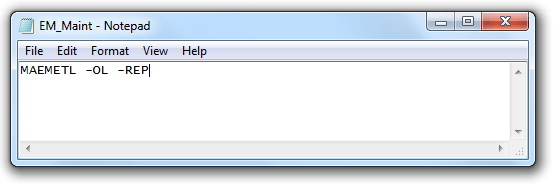
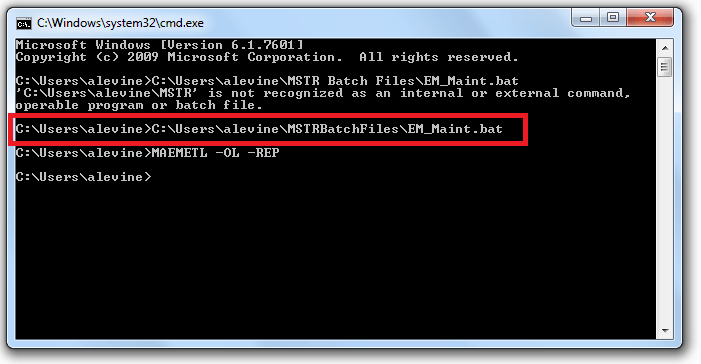
In the example above, the MAEMETL executable will update the folder paths and repopulate the relate tables.
2. Save the file in .bat format.
WARNING:
The third-party product(s) discussed in this technical note is manufactured by vendors independent of Strategy. Strategy makes no warranty, express, implied or otherwise, regarding this product, including its performance or reliability.
233155
