EducationSoftwareStrategy.com
StrategyCommunity

Knowledge Base

Product

Community

Knowledge Base

TopicsBrowse ArticlesDeveloper Zone

Product

Download SoftwareProduct DocumentationSecurity Hub

Education

Tutorial VideosSolution GalleryEducation courses

Community

GuidelinesGrandmastersEvents
x_social-icon_white.svglinkedin_social-icon_white.svg
Strategy logoCommunity

© Strategy Inc. All Rights Reserved.

LegalTerms of UsePrivacy Policy
  1. Home
  2. Topics

KB233476: "Second factor authentication failed" error message appears when logging in with Standard Authentication in MicroStrategy Web 9.5.0


Community Admin

• Strategy


"Second factor authentication failed" error message appears when logging in with Standard Authentication in MicroStrategy Web 9.5.0

SUMMARY:
This issue has been classified as a defect by Strategy.  The impact is limited to Strategy 9.5.0 product when setting Standard Authentication for the first time. A workaround is available in the current document. A solution/code fix for this issue is not available in current releases but is being reviewed for a future Strategy release.
 
SYMPTOM:
After installing 9.5.0 and setting the authentication for Strategy Web 9.5.0 to be Standard Authentication, all the users except for the Administrator get the following error message, even if Strategy Usher has not been defined to be used as an authentication method.

ka04W000000Ohj9QAC_0EM4400000025mb.jpeg


The Web Server encountered an unknown runtime error.
(Second Authentication failed)
 
STEPS TO REPRODUCE:

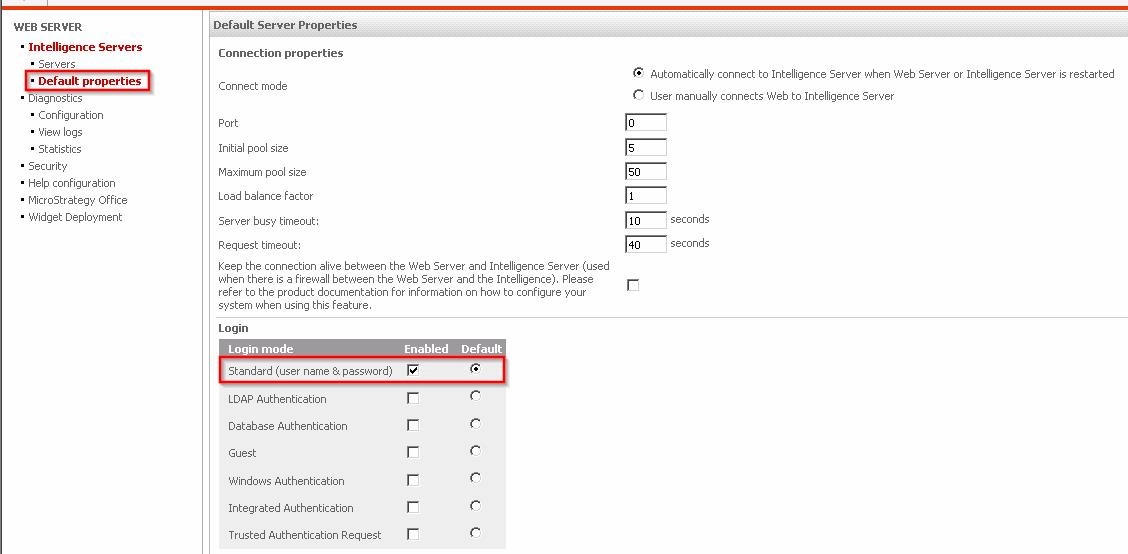
  • In the Strategy Web 9.5.0 Web Admin page > Default properties, define the Login mode as Standard, like shown below.
ka04W000000Ohj9QAC_0EM4400000025mE.jpeg
  • Under the Server Properties, make sure that the Strategy Usher configuration has not been setup, like shown below:
ka04W000000Ohj9QAC_0EM4400000025mD.jpeg
ka04W000000Ohj9QAC_0EM4400000025mR.jpeg
  • Connect the Strategy Web 9.5.0 server to a Strategy Intelligence Server 9.5.0.
  • Go to Strategy Web, and try to login with a user different than the Administrator.


ka04W000000Ohj9QAC_0EM4400000025mV.jpeg


  1. The user will get the error:
    The Web Server encountered an unknown runtime error.
    (Second Authentication failed)

 
CAUSE:
This is a known issue in Strategy Web 9.5.0.
 
ACTION:
This issue has been fixed in Strategy Web 9.5.1. Take advantage of upgrading for a fix.
 
WORKAROUND:

  • In the Strategy Web 9.5.0 Admin page, go to the Server's properties, like shown below.
ka04W000000Ohj9QAC_0EM4400000025mc.jpeg
  • Select "Setup" to access the Strategy Usher configuration, like shown below.
ka04W000000Ohj9QAC_0EM4400000025mG.jpeg
  • Enable the two-factor authentication by checking the box next to it, like shown below.
ka04W000000Ohj9QAC_0EM4400000025mT.jpeg
  • Save the changes with the Administrator account.
  • Disable the two-factor authentication by unchecking the box, like shown below.
ka04W000000Ohj9QAC_0EM4400000025mP.jpeg
  • Save the changes again. The login should be successful now.

Comment

0 comments

Details

Knowledge Article

Published:

April 18, 2017

Last Updated:

April 18, 2017