EducationSoftwareStrategy.com
StrategyCommunity

Knowledge Base

Product

Community

Knowledge Base

TopicsBrowse ArticlesDeveloper Zone

Product

Download SoftwareProduct DocumentationSecurity Hub

Education

Tutorial VideosSolution GalleryEducation courses

Community

GuidelinesGrandmastersEvents
x_social-icon_white.svglinkedin_social-icon_white.svg
Strategy logoCommunity

© Strategy Inc. All Rights Reserved.

LegalTerms of UsePrivacy Policy
  1. Home
  2. Topics

KB233772: Tooltips at the edge of a document get cut off in Express mode in MicroStrategy Web


Community Admin

• Strategy


Tooltips at the edge of a document get cut off in Express mode in MicroStrategy Web.

SYMPTOM:
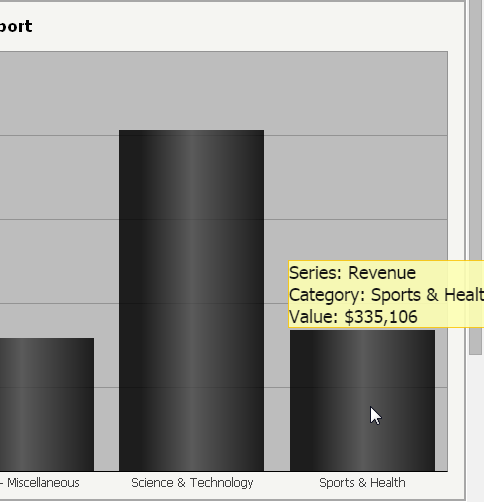
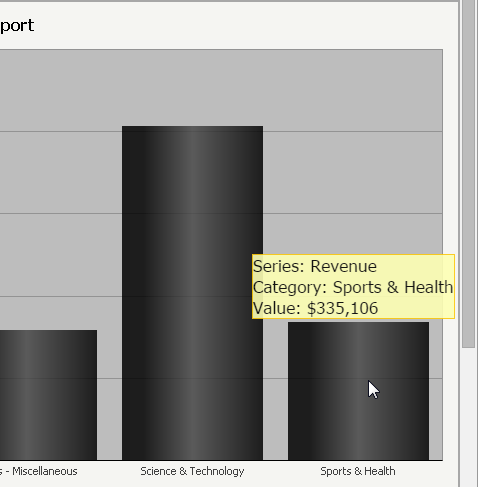
In Strategy Web 9.4.1 and above if an object with a tooltip, such as a graph, is placed near the edge of a document, the tooltip will position itself to stay within the bounds of the document. If the document is run in Express mode, however, the tooltip does not reposition and gets cut off, as shown below.
 
Interactive mode:
ka04W000000Oe8JQAS_0EM4400000025hD.jpeg

 
Express mode:
 

ka04W000000Oe8JQAS_0EM4400000025hC.jpeg

 
STEPS TO REPRODUCE:
Follow these steps in Strategy Web 9.4.x to reproduce the issue in a Strategy Tutorial project.

  1. Place a vertical bar graph on the right most edge of a document.
  2. Hide the legend.
  3. Execute the document in Express mode with zoom set to "Fit to Width."
  4. Observe that the data tooltip for the right-most bar gets cut off.

CAUSE:
This is a known issue with Strategy Web 9.4.1 and above
 
ACTION:
Strategy will continue to investigate and post updates as soon as they are available.


Comment

0 comments

Details

Knowledge Article

Published:

June 13, 2017

Last Updated:

June 13, 2017