EducationSoftwareStrategy.com
StrategyCommunity

Knowledge Base

Product

Community

Knowledge Base

TopicsBrowse ArticlesDeveloper Zone

Product

Download SoftwareProduct DocumentationSecurity Hub

Education

Tutorial VideosSolution GalleryEducation courses

Community

GuidelinesGrandmastersEvents
x_social-icon_white.svglinkedin_social-icon_white.svg
Strategy logoCommunity

© Strategy Inc. All Rights Reserved.

LegalTerms of UsePrivacy Policy
  1. Home
  2. Topics

KB234059: "Message not found in user history list. It may have been deleted from other session already”, error message occurs when browsing hierarchies in prompts of reports in MicroStrategy 9.4.1


Community Admin

• Strategy


The impact is limited to MicroStrategy 9.4.1 when browsing the data explorer when using a Vertica database. This document explains why this error is yielded and what can be done to address the issue. 

SUMMARY:
The impact is limited to Strategy 9.4.1 when browsing the data explorer when using a Vertica database. This document explains why this error is yielded and what can be done to address the issue. 
 
SYMPTOM:
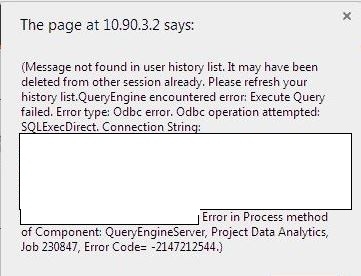
When running a report that contains a prompt, a user may encounter an error when browsing through the hierarchies to select the appriopriate attribute elements, as seen below:
ka04W000000OhfVQAS_0EM440000002JB8.jpeg


"(Message not found in user history list. It may have been deleted fromother session already. Please refresh your history list. QueryEngine encountered error: Execute Query failed. Error type: Odbc error. Odbc operation attempted: SQLExecDirect. Connection String: Error in Process method of Component: QueryEngineServer, Project Data Analytics, Job 231078, Error Code = -2147212544”

 
CAUSE:
One possible cause is that the ODBC driver being used is not supported.  In this specific case, the issue was with a Vertica databases.  What happens is a query is run against the database, through the driver, to select the attribute element. When the configuration is not supported, this will sometimes yield errors since the driver/database cannot handle the inputs or outputs. 
ACTION:
In this scenario, the solution is to switch to a supported driver configuration for the database and version of Strategy.  If this does not work, contact Strategy Technical Support for further assistance. 


Comment

0 comments

Details

Knowledge Article

Published:

April 28, 2017

Last Updated:

April 28, 2017