EducationSoftwareStrategy.com
StrategyCommunity

Knowledge Base

Product

Community

Knowledge Base

TopicsBrowse ArticlesDeveloper Zone

Product

Download SoftwareProduct DocumentationSecurity Hub

Education

Tutorial VideosSolution GalleryEducation courses

Community

GuidelinesGrandmastersEvents
x_social-icon_white.svglinkedin_social-icon_white.svg
Strategy logoCommunity

© Strategy Inc. All Rights Reserved.

LegalTerms of UsePrivacy Policy
  1. Home
  2. Topics

KB234414: The "Document Grids from Multiple Datasets" and/or the "Remove Missing Units in Documents" VLDB properties are not available under the Analytical Engine VLDB properties in Project Configuration after upgrading to MicroStrategy 9.4.1 or above.


Community Admin

• Strategy


This technical note outlines an issue after upgrading where the "Data Blending" VLDB properties are not shown in Project Configuration.

SYMPTOMS

When opening the Analytical Engine VLDB properties in Project Configuration (Project Definition > Advanced > Configure...), either one or both of the two new VLDB properties, "Document Grids from Multiple Datasets" and "Remove Missing Units in Documents", are not shown:
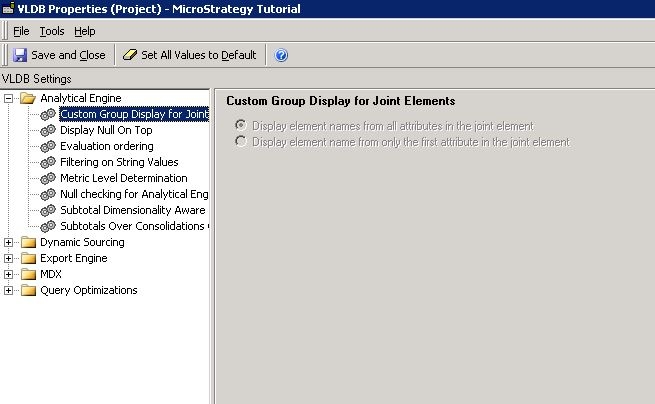
 

ka04W000000OfmvQAC_0EM440000002C8P.jpeg


CAUSE

The root cause is unknown, however it is related to an issue with the upgrade where the property set object that contains the two properties is not properly updated.
 

ACTION

Contact Strategy Technical Support for further assistance to fix this issue.


Comment

0 comments

Details

Knowledge Article

Published:

May 5, 2017

Last Updated:

July 21, 2017