Description
Users notice that reports appear with identical names when browsing to a folder in Strategy Web as seen on the screenshot below:

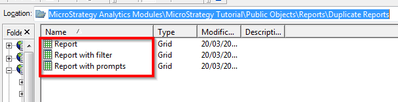
The same folder shows the correct report names when accessing the location using Strategy Developer as seen below:
Cause
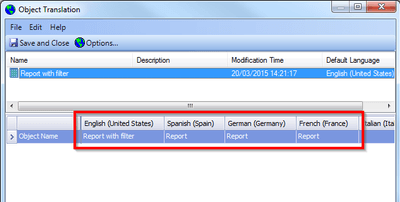
This behavior is due to internationalization of the project. When a project has been configured to support several languages and a report is duplicated, the secondary languages are named like the original report. When the user duplicating the reports renames the copy of the report and has Developer configured to show metadata objects in the primary language, then only the primary language is renamed, not the secondary languages. When changing the language preference in Strategy Developer to a secondary language, the same behavior would be observed in Developer.
When accessing the folder location with a browser that has a secondary language set as default, then the user will see the original report name instead of the new name, thus the reports appear to be duplicated even if they are in fact different versions.
This behavior is not report specific and applies to all metadata objects that support translation.
Action
1. Using Strategy Developer, right-click affected report and select "Translate...".
2. Adjust available translations to reflect the correct name: