EducationSoftwareStrategy.com
StrategyCommunity

Knowledge Base

Product

Community

Knowledge Base

TopicsBrowse ArticlesDeveloper Zone

Product

Download SoftwareProduct DocumentationSecurity Hub

Education

Tutorial VideosSolution GalleryEducation courses

Community

GuidelinesGrandmastersEvents
x_social-icon_white.svglinkedin_social-icon_white.svg
Strategy logoCommunity

© Strategy Inc. All Rights Reserved.

LegalTerms of UsePrivacy Policy
  1. Home
  2. Topics

KB234940: "General error. Invalid verifier Type" error occurs when creating an Oracle 11gR2 DSN using Oracle Wire Protocol driver from MicroStrategy Connectivity Wizard and Microsoft's ODBC Administrator in MicroStrategy 9.4.1


Community Admin

• Strategy


This knowledge base article outlines a known issue in MicroStrategy Developer 9.4.1

SUMMARY:
This issue is classified as a defect with Strategy Technical Support. This will hinder users from creating a DSN against Oracle 11gR2 database with Oracle Wallet for OID authentication using Strategy provided Data Direct's Oracle Wire Protocol driver version 7.x. The error occurs both in Strategy's Connectivity Wizard and Microsoft's ODBC Administrator as long as Data Direct's Oracle Wire Protocol driver version 7.x is used to create the DSN.
SYMPTOM:
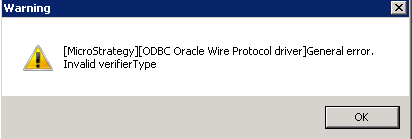
When a user tries to create a DSN against Oracle 11gR2 database that is actively using Oracle Wallet for OID authentication with Strategy's certified Data Direct Oracle Wire Protocol Driver version 7.x, the following error may occur: 
ka04W000000OafoQAC_0EM440000002C8M.jpeg


[Strategy][ODBC Oracle Wire Protocol driver]General error.
Invalid verifierType

 
CAUSE:
This is a known issue in Strategy Developer 9.4.1. Previous Oracle Wire Protocol drivers that ship with Strategy version 9.4.0 and below do not cause the error message.
WORKAROUND:
Oracle Native Client Driver can be alternatively used to construct a DSN against a Oracle 11gR2 database with OID authentication.
ACTION:
Currently this issue is still being reviewed for feasibility by our Technology team.
 

KB234940


Comment

0 comments

Details

Knowledge Article

Published:

April 6, 2017

Last Updated:

December 31, 2018