EducationSoftwareStrategy.com
StrategyCommunity

Knowledge Base

Product

Community

Knowledge Base

TopicsBrowse ArticlesDeveloper Zone

Product

Download SoftwareProduct DocumentationSecurity Hub

Education

Tutorial VideosSolution GalleryEducation courses

Community

GuidelinesGrandmastersEvents
x_social-icon_white.svglinkedin_social-icon_white.svg
Strategy logoCommunity

© Strategy Inc. All Rights Reserved.

LegalTerms of UsePrivacy Policy
  1. Home
  2. Topics

KB235056: Metric Names display on the wrong axis on a Visual Insight Dashboard in MicroStrategy Mobile 9.4.1 for iOS


Community Admin

• Strategy


This Knowledge Base article describes a known issue that metric names display on the wrong axis on a Visual Insight Dashboard in MicroStrategy Mobile 9.4.1 for iOS. This issue has been addressed in MicroStrategy Mobile 10.1 application for iOS. Upgrade to this release to take advantage of the fix.

SYMPTOM:
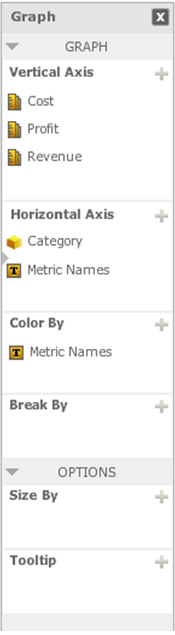
In Visual Insight Dashboards in Strategy Web 9.4.1, users can create graphs with multiple axes. In this type of graphs, users can place the actual metrics in one axis but the "Metric Names" in a different axis, as shown below:
 

ka04W000000OhPWQA0_0EM4400000029yN.jpeg

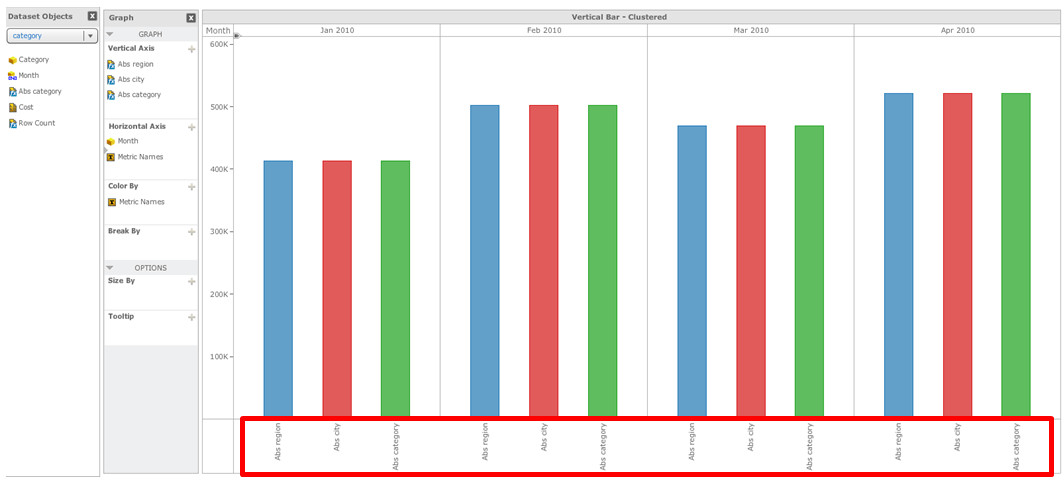
This results in the correct display in Strategy Web 9.4.1, as shown below:
ka04W000000OhPWQA0_0EM4400000029yL.jpeg

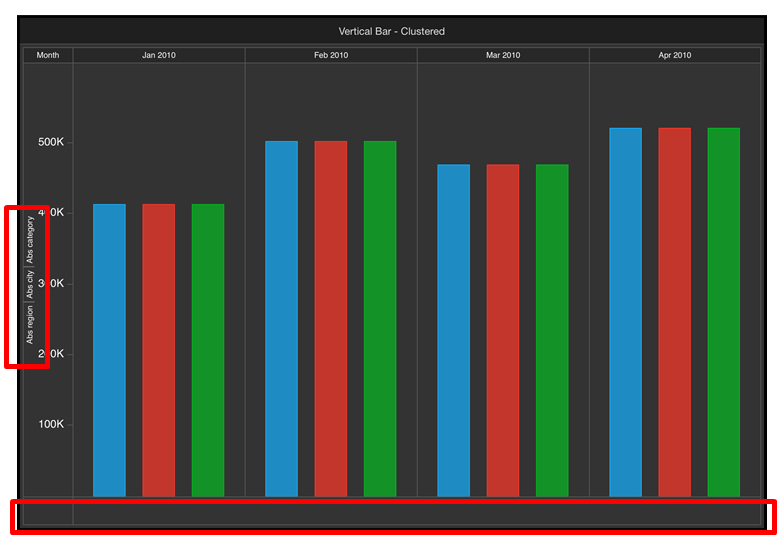
However, when viewing this Visual Insight Dashboard in Strategy Mobile 9.4.1 for iOS, the "Metric Names" appear on the same axis where the metric values are.
ka04W000000OhPWQA0_0EM4400000029yH.jpeg

The behavior changes when only one metric is used. In this case, the Metric Names will show up on the incorrect axis in both Strategy Web and Strategy Mobile 9.4.1.
 
STEPS TO REPRODUCE:
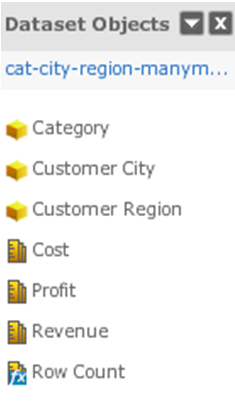
  • Create a Visual Insight dashboard with one dataset with many metrics as shown below:
ka04W000000OhPWQA0_0EM4400000029yJ.jpeg
  • Create a graph which allows for multiple axes such as Bar, Line, Bubble, etc.
  • Place all of the metrics in the Vertical Axis section.
  • Place the "Metric Names" in the Horizontal Axis section.
  • Separate them by any attribute on the Horizontal Axis. Steps 3 - 5 are shown below:
ka04W000000OhPWQA0_0EM4400000029yN.jpeg
  • Notice that the derived metrics display correctly on the desired axes in Strategy Web, but incorrectly in Strategy Mobile.

 
CAUSE:
This is a known issue in Strategy Mobile 9.4.1 application for iOS.
 
ACTION:
This issue has been addressed in Strategy Mobile 10.1 application for iOS. Upgrade to this release to take advantage of the fix.
 
WORKAROUND:
Put the "Metric Names" on the same axis as the Metrics themselves when creating Visual Insight Dashboards.


Comment

0 comments

Details

Knowledge Article

Published:

May 22, 2017

Last Updated:

May 22, 2017