SYMPTOM:
In Strategy Command Manager 9.x, when executing the script “LIST ALL PROPERTIES FOR USERS IN GROUP XX”, one of the properties displayed is the physical address of the user. However, when executing the script "LIST PHYSICALADDRESS FOR USERS IN GROUP XX” the following error message appears:
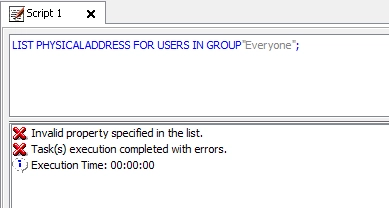
Invalid property specified in the list.
Task(s) execution completed with error.
Execution Time: 00:00:00
CAUSE:
This is working as designed. Strategy Command Manager does not support the command to list the physical addresses property separately. Although PHYSICALADDRESS is a valid parameter, it is not accepted in this context.
ACTION:
Currently, there is no option available to list only the physical address for users through a Strategy Command Manager script.
WORKAROUND:
The following custom Command Manager procedure can be used to achieve this result.
<?xml version="1.0" encoding="ISO-8859-1" standalone="no"?>
<PROCEDURE_DEFINITION>
<DESCRIPTION/>
<CODE>ResultSet USERS = executeCapture("LIST PROPERTIES FOR USERS IN GROUP " + "\"" +sGroup +"\"" + ";");
USERS.moveFirst();
while(!USERS.isEof()){
 String rLogin=USERS.getFieldValueString(LOGIN);
 printOut("User Login = " + rLogin);
 ResultSet rAddress=(ResultSet)USERS.getFieldValue(DS_ADDRESSES_RESULTSET);

 rAddress.moveFirst();
 //go through each address
 while(!rAddress.isEof()){
 String rPhyAdr = rAddress.getFieldValueString(DS_ADDRESS_PHYSICAL);
 printOut("--------Physical Address: " + rPhyAdr);
 rAddress.moveNext();
 }
USERS.moveNext();
 } </CODE>
<SAMPLE>EXECUTE PROCEDURE ListLoginAndAddresses ("Customers");</SAMPLE>
<VERSION>1.0</VERSION>
<TYPE>CUSTOM</TYPE>
<INPUT_PARAMS>
<INPUT INPUT_TYPE="STRING">sGroup</INPUT>
</INPUT_PARAMS>
<CLASSPATH/>
<TEST_INPUT>
<TEST_INPUT_PARAM>Customers</TEST_INPUT_PARAM>
</TEST_INPUT>
<TEST_CONNECTION_INFO>
<TEST_PSN_NAME>Strategy Analytics Modules</TEST_PSN_NAME>
<TEST_USERNAME>administrator</TEST_USERNAME>
<TEST_PASSWORD>00000000453ec11a5ae5e97cb1fe638b94860d28c911585ab4fc4c77d5b77ded</TEST_PASSWORD>
</TEST_CONNECTION_INFO>
</PROCEDURE_DEFINITION>