SYMPTOM:
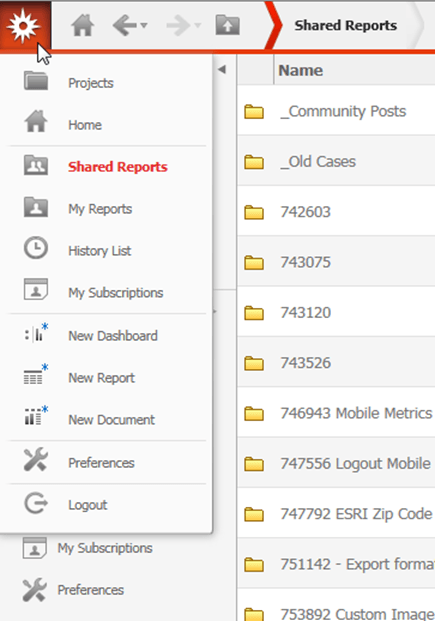
In Strategy Web 9.4.1 Hotfix 7, if a user navigates to the "Shared Reports" folder, then clicks on the top left Strategy Startburst icon, and navigates to "My Reports", the page will reload, but the page will still show the contents of the “Shared Reports” folder. If the Starburst menu is clicked again, the user will see that the font of the "My Reports" folder link changes to bold red, indicating it is the currently selected folder, but the page itself has not changed over to the desired "My Reports" folder. This is shown in the image below:
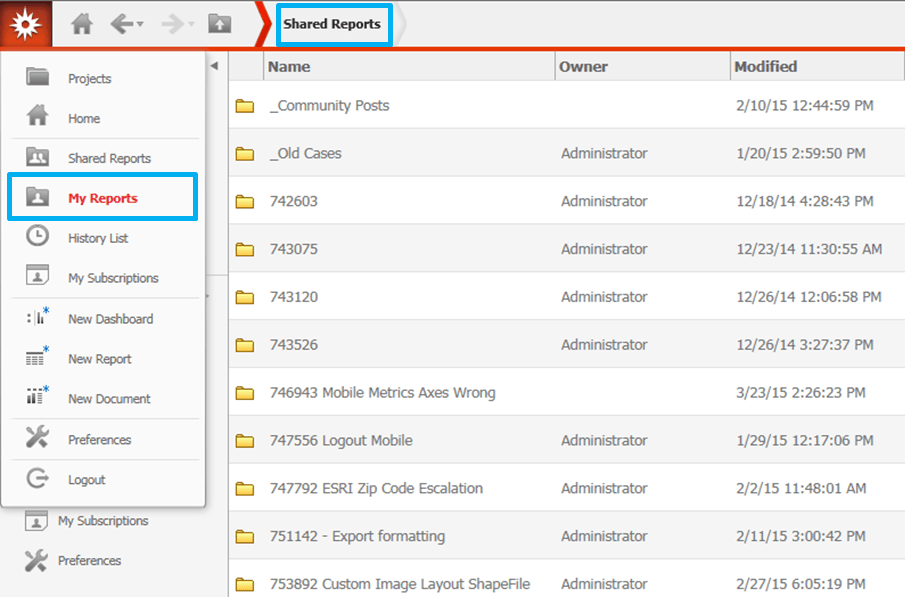
This issue also occurs when in the exact opposite scenario, if the user is browsing "My Reports" but wishes to navigate to "Shared Reports" using the Starburst icon menu.
STEPS TO REPRODUCE:
CAUSE:
This is a known issue in Strategy Web 9.4.1 Hotfix 7.
ACTION:
This issue has been fixed in Strategy Web 10. Upgrade to this version to take advantage of this fix.
WORKAROUND:
Select any other option in the Starburst icon menu while browsing the "Shared Reports" or "My Reports" folders, and then try to select "My Reports" or "Shared Reports" in the Starburst menu.
