This technical note outlines a known issue with the Item Order Form document located in the Strategy Tutorial project. This issue only occurs when answering the Subcategory prompt with more than one answer.
When running the Item Order Form document (located in Public Objects\Reports\Strategy Platform Capabilities\Strategy Transaction Services) and selecting multiple subcategories in the subcategory prompt, the following error is displayed:
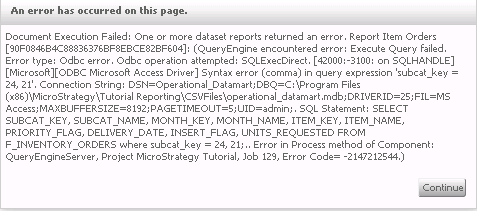
Document Execution Failed: One or more dataset reports returned an error. Report Item Orders [90F0846B4C88836376BF8EBCE82BF604]: (QueryEngine encountered error: Execute Query failed. Error type: Odbc error. Odbc operation attempted: SQLExecDirect. [42000:-3100: on SQLHANDLE] [Microsoft][ODBC Microsoft Access Driver] Syntax error (comma) in query expression 'subcat_key = 24, 21'. Connection String: DSN=Operational_Datamart;DBQ=C:\Program Files (x86)\Strategy\Tutorial Reporting\CSVFiles\operational_datamart.mdb;DRIVERID=25;FIL=MS Access;MAXBUFFERSIZE=8192;PAGETIMEOUT=5;UID=admin;. SQL Statement: SELECT SUBCAT_KEY, SUBCAT_NAME, MONTH_KEY, MONTH_NAME, ITEM_KEY, ITEM_NAME, PRIORITY_FLAG, DELIVERY_DATE, INSERT_FLAG, UNITS_REQUESTED FROM F_INVENTORY_ORDERS where subcat_key = 24, 21;.. Error in Process method of Component: QueryEngineServer, Project Strategy Tutorial, Job 129, Error Code= -2147212544.)
This is a known issue in Strategy Analytics Modules 9.x. The reason this error occurs is because the WHERE clause in the custom SQL is designed to only handle a single prompt answer and if a prompt is answered with more than one element incorrect SQL is generated.
This issue is fixed in Strategy 10. Upgrade to take advantage of the fix.
To work around this behavior, open Developer and perform the following:
1. Right click on the "Item Order form" document and select Search for Components.
2. Inside the Components of Item Order Form, find the "Report Item Orders" report , then right click on the report and select Edit.
3. Inside the report editor, click on the Freeform SQL definition (refer to screenshot)
4. Inside the Freeform SQL Editor change the following SQL "where subcat_key = [Elements of Subcategory filtered by Electronics]" to "where subcat_key in ([Elements of Subcategory filtered by Electronics])"
5. Click Ok in the Freeform SQL report Editor and save the report.
The document can now be run with multiple prompt answers without issues.
