SUMMARY:
This document outlines a known issue about "Failed to determine the deferred inbox location" error message appearing when upgrading metadata and migrating History List messages from file to Database in Strategy Analytics 9.5. The workaround is to upgrade metadata first and then migrate History List messages.
SYMPTOM:
"Failed to determine the deferred inbox location" error message appears when upgrading metadata and migrating History List messages from file to Database in Strategy 9.5
STEPS TO REPRODUCE:
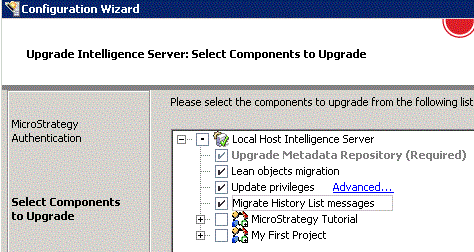
 [-] Upgrade Metadata Repository (Required)
 [-] Lean objects migration
 [-] Upgrade privileges
 [-] Migrate History List messages
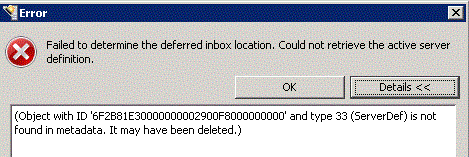
Failed to determine the deferred inbox location. Could not retrieve the active server definition. (Object with ID '6F2B81E30000000004490DA000000000' and type 33 (ServerDef) is not found in metadata. It may have been deleted.)
CAUSE:
This is a known issue in Strategy 9.5.
ACTION:
This issue has been addressed in Strategy 10.1 and above. Upgrade to this version or above to take advantage of the fix.
WORKAROUND:
Upgrade the first 3 components first as shown below:
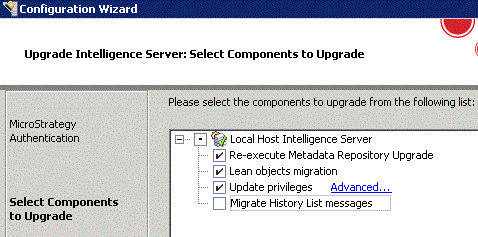
 [-] Upgrade Metadata Repository (Required)
 [-] Lean objects migration
 [-] Upgrade privileges
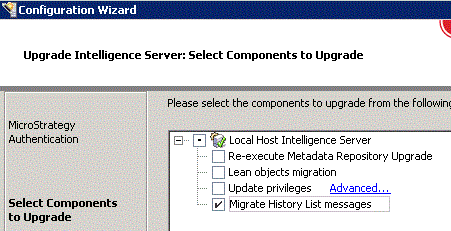
The Strategy Internal Reference Number for the issue discussed in this technical note is DE14263.
