EducationSoftwareStrategy.com
StrategyCommunity

Knowledge Base

Product

Community

Knowledge Base

TopicsBrowse ArticlesDeveloper Zone

Product

Download SoftwareProduct DocumentationSecurity Hub

Education

Tutorial VideosSolution GalleryEducation courses

Community

GuidelinesGrandmastersEvents
x_social-icon_white.svglinkedin_social-icon_white.svg
Strategy logoCommunity

© Strategy Inc. All Rights Reserved.

LegalTerms of UsePrivacy Policy
  1. Home
  2. Topics

KB235590: A text box with dynamic text, driven by a selector, displays the first attribute element in the list when "All" is selected in MicroStrategy Web 9.4.x and 10.x


Community Admin

• Strategy


SYMPTOM:
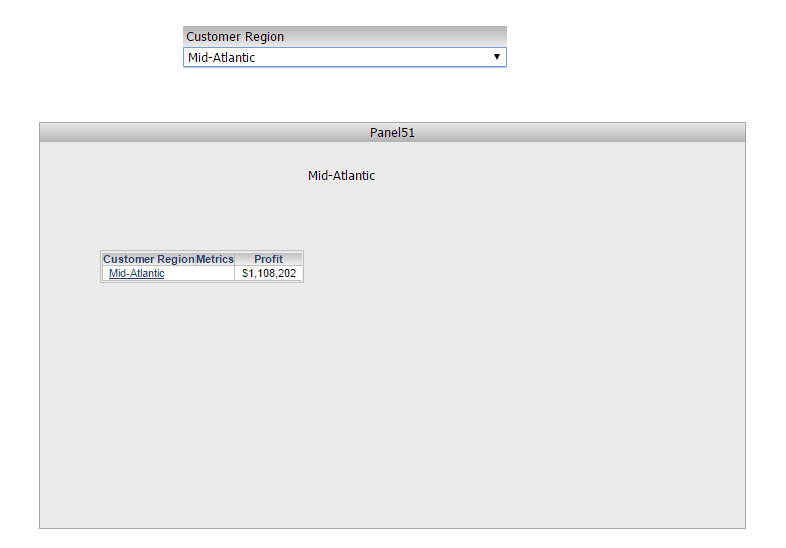
In Strategy Web 9.x, when a text box with dynamic text is inside a panel stack targeted by a selector, the dynamic text changes to the same value as selected in the selector.
In the picture below, the selector value is set to "Mid-Atlantic". Notice that the dyanmic text also displays "Mid-Atlantic".
ka04W000000OhQXQA0_0EM4400000025gW.jpeg

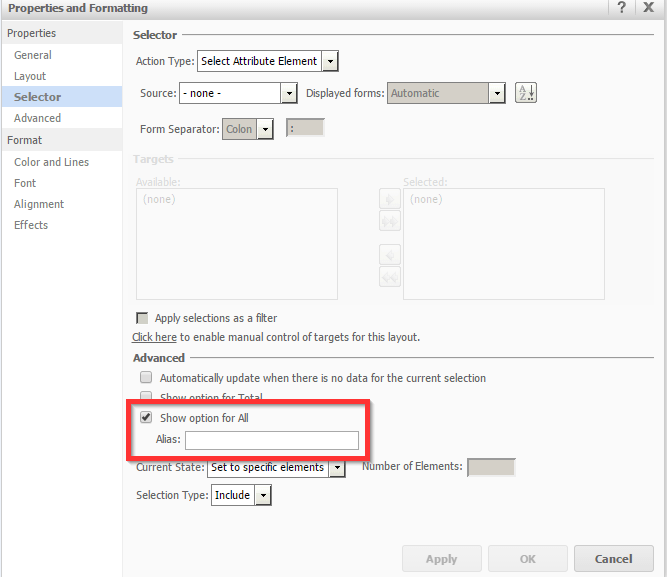
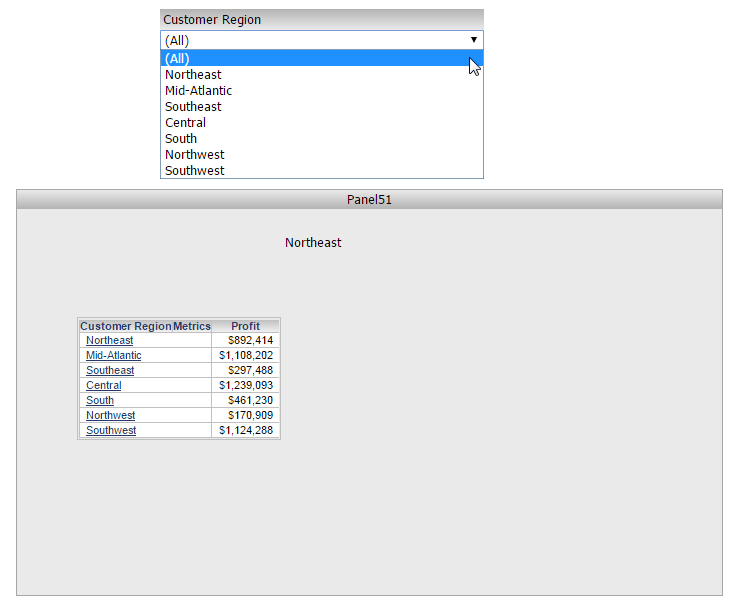
However, if the selector is configured to "Show option for All", and the selector value is set to "All",  the dynamic text does not display "All" or its alias or each individual element contained by the selector, instead it only displays the first available attribute element in the list. 
The setting for "Show option for All" is shown in the image below:
ka04W000000OhQXQA0_0EM4400000025gc.jpeg

As seen below, the selector value is set to "All". However, the dynamic text displays "Northeast", which is the first available attribute element in the list, rather than "All".
ka04W000000OhQXQA0_0EM4400000025ga.jpeg

 
STEPS TO REPRODUCE:

  1. In the Strategy Tutorial project in Strategy Web 9.x, create a RS Document with a dataset that has the "Customer Region" attribute and the "Profit" metric.
  2. Insert a drop-down selector and target a panel stack with a grid, that has the attribute and metric, and text box.
  3. In the Dataset Objects pane, drag the "Customer Region" attribute and insert it in the text box to create dynamic text.
  4. In the "Properties and Formatting" > "Selector" window, enable the "Show option for All" setting.
  5. Execute the RS Document and change the selector value to "All". Notice that the dynamic text displays "Northeast" instead of "All".

 
CAUSE:
This is a limitation in Strategy Web 9.x. A request has been logged to address this issue.
 
ACTION:
Currently this issue is still being reviewed for feasibility by our Technology team and it is not scoped for any upcoming scheduled Strategy release.
 
The Strategy Internal Reference Number for the issue discussed in the technical note is 446053.


Comment

0 comments

Details

Knowledge Article

Published:

May 22, 2017

Last Updated:

May 22, 2017