EducationSoftwareStrategy.com
StrategyCommunity

Knowledge Base

Product

Community

Knowledge Base

TopicsBrowse ArticlesDeveloper Zone

Product

Download SoftwareProduct DocumentationSecurity Hub

Education

Tutorial VideosSolution GalleryEducation courses

Community

GuidelinesGrandmastersEvents
x_social-icon_white.svglinkedin_social-icon_white.svg
Strategy logoCommunity

© Strategy Inc. All Rights Reserved.

LegalTerms of UsePrivacy Policy
  1. Home
  2. Topics

KB235678: Navigation buttons are missing from the toolbar for a document that runs to Full Screen mode in MicroStrategy Web 9.4.1


Community Admin

• Strategy


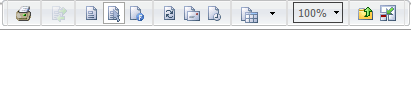
In MicroStrategy Web 9.4.1, a user without the "Web simple graph formatting" privilege under Web Analyst cannot see navigation buttons on a RS Document configured to intially execute in Full Screen mode until the user exits to Normal Mode and re-enters Full Screen mode.

SYMPTOM:
In Strategy Web 9.4.1, a user without the "Web simple graph formatting" privilege under Web Analyst cannot see navigation buttons on a RS Document configured to intially execute in Full Screen mode until the user exits to Normal Mode and re-enters Full Screen mode.
Expected Navigation buttons:

ka04W000000Oh6jQAC_0EM4400000025gR.jpeg

No Navigation buttons:

ka04W000000Oh6jQAC_0EM4400000025gQ.jpeg

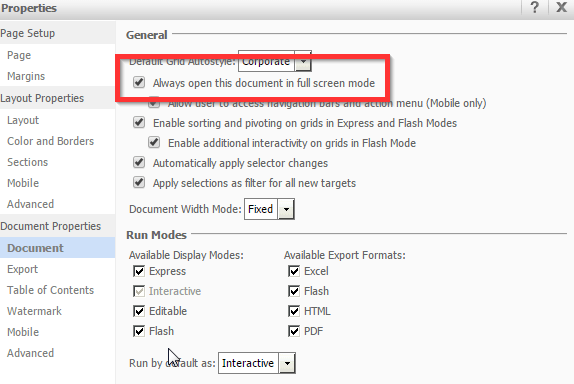
The image below shows the Document setting "Always open this document in full screen mode" enabled:
ka04W000000Oh6jQAC_0EM4400000025gF.jpeg

 
However, after the user exits Full screen mode to display the docuemnt in Normal mode and re-enters Full Screen mode, the navigation buttons can be seen:

ka04W000000Oh6jQAC_0EM4400000025ge.jpeg

STEPS TO REPRODUCE:

  • Create a user with the "Web simple graph formatting" privilege. 
  • Create a document in Strategy Web and in the Document Properties, enable the setting "Always open this document in full screen mode".
  • Execute the RS Document and notice that the navigation buttons appear.
  • Create a user without the "Web simple graph formatting" privilege.
  • Execute the same RS Document and notice that the navigation buttons do not appear.
  • Exit to Normal mode, as shown below:
ka04W000000Oh6jQAC_0EM4400000025gO.jpeg
  • Re-enter Full Screen mode, as shown below:
ka04W000000Oh6jQAC_0EM4400000025gg.jpeg
  • Notice that the navigation buttons appear when it initially did not.

 
CAUSE:
This is a known issue in Strategy Web 9.4.1. 
 
ACTION:
Currently this issue is still being reviewed for feasibility by our Technology team and it is not scoped for any upcoming scheduled Strategy release.


Comment

0 comments

Details

Knowledge Article

Published:

June 2, 2017

Last Updated:

June 2, 2017