EducationSoftwareStrategy.com
StrategyCommunity

Knowledge Base

Product

Community

Knowledge Base

TopicsBrowse ArticlesDeveloper Zone

Product

Download SoftwareProduct DocumentationSecurity Hub

Education

Tutorial VideosSolution GalleryEducation courses

Community

GuidelinesGrandmastersEvents
x_social-icon_white.svglinkedin_social-icon_white.svg
Strategy logoCommunity

© Strategy Inc. All Rights Reserved.

LegalTerms of UsePrivacy Policy
  1. Home
  2. Topics

KB235703: "Object variable or With block variable not set" error message appears when attempting to create or modifying a Database Connection in MicroStrategy 9.x and the Intelligence Server is on UNIX/Linux


Community Admin

• Strategy


This Knowledge Base article describes a known issue that can occur when creating or modifying a Database Connection in MicroStrategy Developer 9.x when the Intelligence Server is on UNIX/Linux.

SYMPTOM:
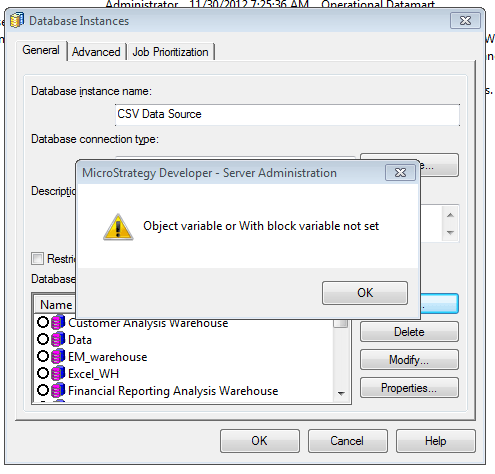
When attempting to create or modify a Database Connection in the Database Instance Editor in Strategy Developer 9.x and Strategy Intelligence Server 9.x running on UNIX/Linux, the following error is seen:
ka04W000000OeeeQAC_0EM4400000029Gt.jpeg


Object variable or With block variable not set

 
CAUSE:
A potential cause of this issue is that there are duplicate DSN entries in the odbc.ini file on the Intelligence Server.
 
ACTION:
This issue has been addressed in Strategy 10.x. Upgrade to this version to take advantage of this fix.
 
WORKAROUND:
Removing one of the duplicate entries from the odbc.ini file so that there is a unique DSN will allow the database connection to be created or modified in the Database Instance as desired.
 
235703


Comment

0 comments

Details

Knowledge Article

Published:

June 8, 2017

Last Updated:

June 8, 2017