EducationSoftwareStrategy.com
StrategyCommunity

Knowledge Base

Product

Community

Knowledge Base

TopicsBrowse ArticlesDeveloper Zone

Product

Download SoftwareProduct DocumentationSecurity Hub

Education

Tutorial VideosSolution GalleryEducation courses

Community

GuidelinesGrandmastersEvents
x_social-icon_white.svglinkedin_social-icon_white.svg
Strategy logoCommunity

© Strategy Inc. All Rights Reserved.

LegalTerms of UsePrivacy Policy
  1. Home
  2. Topics

KB236278: 'Reset Selections' button triggers display of Information window in a report services document in MicroStrategy 9.4.1 HotFix 4.


Stefan Zepeda

Salesforce Solutions Architect • Strategy


This issue has been classified as a defect by MicroStrategy 9.4.1. The impact is limited to MicroStrategy 9.4.1 HotFix 4 product only when you reset the selections. This issue is not observed on applying 9.4.1 HotFix 7.

SUMMARY:
This article describes an issue where an information window incorrectly displays in Strategy 9.4.1. The impact is limited to Strategy 9.4.1 HotFix 4 product only when you reset the selections. This issue is not observed on applying 9.4.1 HF7.
 
SYMPTOM:
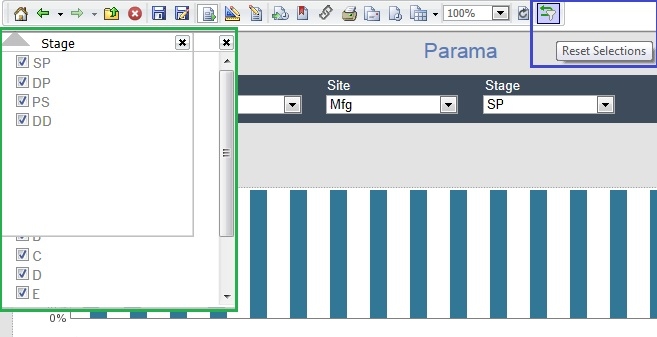
In Strategy 9.4.1 HotFix 4, in a Report Services document with predefined selectors, once you click on the Reset Selections button to reset the selectors, all the information windows are displayed as seen in the below picture.
 

ka02R000000kbHKQAY_0EM440000002C82.jpeg

 
CAUSE:
This is a known issue in Strategy 9.4.1 HotFix 4
 
ACTION:
This issue has not been observed in Strategy 9.4.1 HotFix 7.   Upgrade to 9.4.1 HotFix 7 or above to take advantage of the fix.


Comment

0 comments

Details

Knowledge Article

Published:

April 10, 2017

Last Updated:

July 21, 2017