EducationSoftwareStrategy.com
StrategyCommunity

Knowledge Base

Product

Community

Knowledge Base

TopicsBrowse ArticlesDeveloper Zone

Product

Download SoftwareProduct DocumentationSecurity Hub

Education

Tutorial VideosSolution GalleryEducation courses

Community

GuidelinesGrandmastersEvents
x_social-icon_white.svglinkedin_social-icon_white.svg
Strategy logoCommunity

© Strategy Inc. All Rights Reserved.

LegalTerms of UsePrivacy Policy
  1. Home
  2. Topics

KB236655: Dynamic aliasing stops working after moving a metric's place on a grid in Editable mode in MicroStrategy Web.


Community Admin

• Strategy


Dynamic aliasing stops working after moving a metric's place on a grid in Editable mode in MicroStrategy Web.

SYMPTOM
As per tech note KB40091, Strategy Web 9.3.0, users can configure a report to allow prompt answers to be added to the name of a metric, thus dynamically aliasing the metric. In Strategy Web 9.4.x, and 9.5.x., dynamic metrics will become static when they are moved left or right on a grid in Editable mode. These dynamic metrics will then become static in all modes.
 
STEPS TO REPRODUCE
Follow these steps to reproduce in a Strategy Tutorial Project. 
  • Create a report with an attribute and two metrics.
  • Add a prompt for the  attribute.
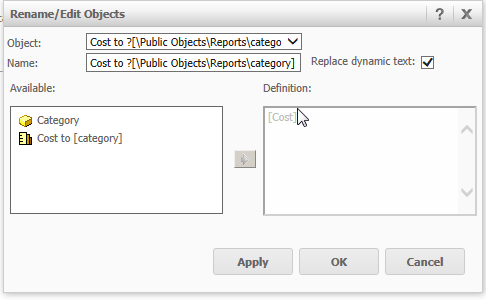
  • Use a dynamic name for one of the metrics by following the directions in tech note KB40091. See image below for the dynamic metric used. 
ka04W00000148RpQAI_0EM4400000025fh.jpeg
  • Create a dashboard using the dataset from the previous steps.
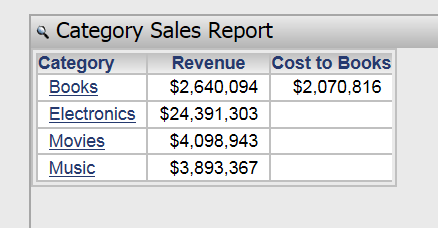
  • Drag the dataset to the dashboard layout. The metric should inherit a dynamic name. The prompt is answered with Books, so the metric names changes to Cost to Books, as shown below:
ka04W00000148RpQAI_0EM4400000025fm.jpeg
ka04W00000148RpQAI_0EM4400000025fs.jpeg
  • In Editable mode move the metric left or right. Below the metric was moved to the left:
ka04W00000148RpQAI_0EM4400000025fk.jpeg
  • Now, re-prompt the document and selecting Electronics. The metric now has a static name in all modes, regardless of the prompt answer.
ka04W00000148RpQAI_0EM4400000025fo.jpeg
ka04W00000148RpQAI_0EM4400000025fq.jpeg

 
CAUSE
This is a known issue in Strategy Web 9.4.x, and 9.5.x..
 
ACTION
Currently, this issue is still being reviewed by our Technology team and it is not currently scoped for any upcoming scheduled Strategy release.
 
The Strategy Internal Reference Number for the issue discussed in this technical note is 1014737.


Comment

0 comments

Details

Knowledge Article

Published:

June 16, 2017

Last Updated:

June 16, 2017