EducationSoftwareStrategy.com
StrategyCommunity

Knowledge Base

Product

Community

Knowledge Base

TopicsBrowse ArticlesDeveloper Zone

Product

Download SoftwareProduct DocumentationSecurity Hub

Education

Tutorial VideosSolution GalleryEducation courses

Community

GuidelinesGrandmastersEvents
x_social-icon_white.svglinkedin_social-icon_white.svg
Strategy logoCommunity

© Strategy Inc. All Rights Reserved.

LegalTerms of UsePrivacy Policy
  1. Home
  2. Topics

KB236686: Purge individual web application caches in MicroStrategy Web


Community Admin

• Strategy


In MicroStrategy Web, administrators can now purge individual caches from the web application cache pool.

Summary

Strategy Web 9.4.1-10.x keeps certain commonly used formatting properties in the web application cache pool. Strategy Web 9.4.1 or 10.x administrators can purge all the web application caches if necessary by following this technical note:
KB16403: How to Purge Web Caches in MicroStrategy Web and Web Universal 9.x
In Strategy Web 9.4.1 HF9,- 10.x administrators can now purge individual caches from the web application cache pool as shown below:
ka04W00000148PHQAY_0EM4400000025lk.jpeg


Clear individual caches from the web application cache pool

  • Access the Strategy Web Administrator purge cache page typically the URL below:
     
    
    http://localhost/MicroStrategy/asp/Admin.aspx?pg=purgecaches

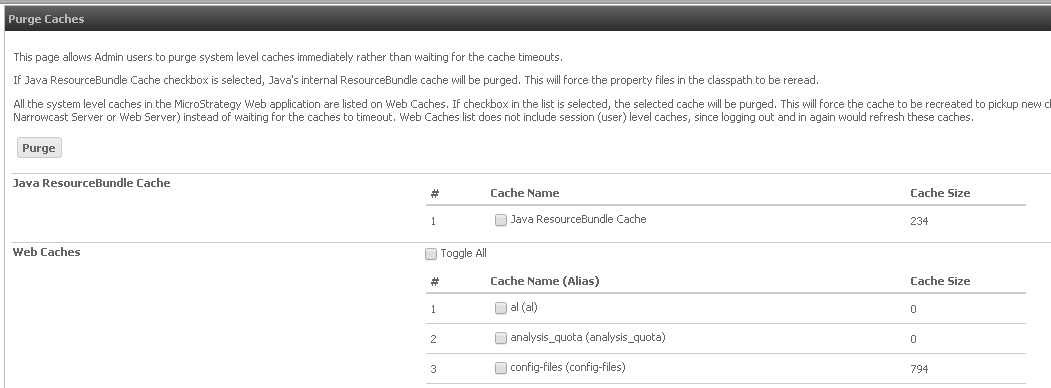
  • The page below will render showing the cache name and the cache size (number of key-value pairs in the HashMap):

ka04W00000148PHQAY_0EM4400000025lq.jpeg
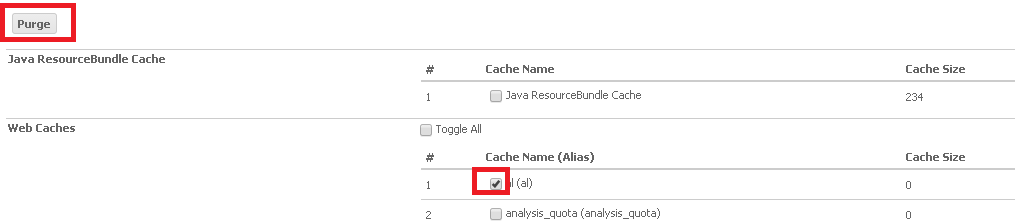
  • Select the cache to be purged or Toggle All and select Purge as shown below:

ka04W00000148PHQAY_0EM4400000025ll.jpeg


Comment

0 comments

Details

Knowledge Article

Published:

April 6, 2017

Last Updated:

July 21, 2017