EducationSoftwareStrategy.com
StrategyCommunity

Knowledge Base

Product

Community

Knowledge Base

TopicsBrowse ArticlesDeveloper Zone

Product

Download SoftwareProduct DocumentationSecurity Hub

Education

Tutorial VideosSolution GalleryEducation courses

Community

GuidelinesGrandmastersEvents
x_social-icon_white.svglinkedin_social-icon_white.svg
Strategy logoCommunity

© Strategy Inc. All Rights Reserved.

LegalTerms of UsePrivacy Policy
  1. Home
  2. Topics

KB236739: How to create custom color thresholds in Visual Insight in MicroStrategy 9.4.x?


Community Admin

• Strategy


This document explains how to create custom color thresholds in a Visual Insight dashboard in MicroStrategy 9.4.x.

SUMMARY
This document explains how to create custom color thresholds in Visual Insight in Strategy 9.4.x.
 
ACTION
1. Create a new Visual Insight Dashboard
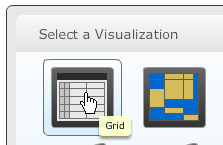
2. Add a Grid Visualization
ka04W000001MKyCQAW_0EM4400000025kM.jpeg

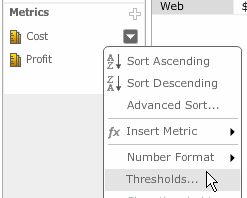
3. In the Grid pane, select the drop down next to a Metric and choose Thresholds
ka04W000001MKyCQAW_0EM4400000025kN.jpeg

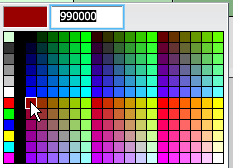
4. In the Threshold window, double click on a band to change its color
ka04W000001MKyCQAW_0EM4400000025kL.jpeg

5. Click the x button in the top right corner of a band to remove it

ka04W000001MKyCQAW_0EM4400000025kQ.jpeg

6. Hit the Ctrl key and click in the middle of a band to add a new band. There will be a small + next to the cursor.

ka04W000001MKyCQAW_0EM4400000025kR.jpeg

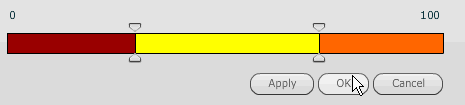
7. Select Apply/OK to apply the custom color threshold
ka04W000001MKyCQAW_0EM4400000025kO.jpeg

  
TO LEARN MORE
KB47370: How to remove extra thresholds in MicroStrategy Web Visual Insight 9.4.x
KB44432: Threshold images applied on a Visual Insight Dashboard are not exported to Flash or PDF formats in MicroStrategy Web 9.3.1 Hotfix 2
KB44464: Threshold is not applied in the Total of the Visual Insight Dashboard in MicroStrategy Web 9.3.x


Comment

0 comments

Details

Knowledge Article

Published:

March 31, 2017

Last Updated:

March 31, 2017