SYMPTOM
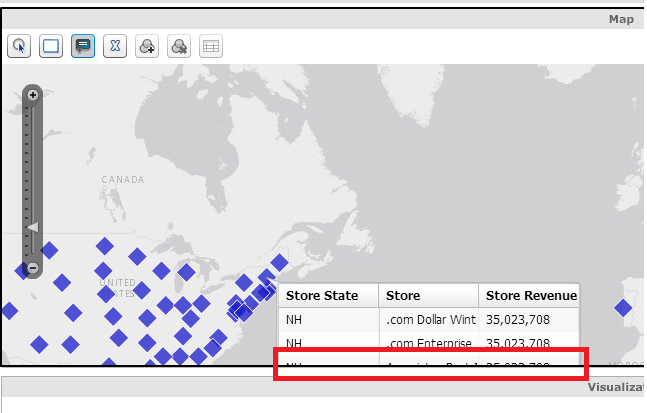
In Strategy Web 9.4.1, users can create ESRI Map visualizations in Visual Insight. They can then add Tooltips to the visualization, to get a functionality similar to an information window. However, when the tooltip has more data than there is room for in the visualization window, the tooltip grid gets cut off and there is no way to scroll, as shown below:
STEPS TO REPRODUCE
CAUSE
This is a known issue in Strategy Web 9.4.1.
ACTION
Currently this issue is still being reviewed for feasibility by our Technology team and it is not scoped for any upcoming scheduled Strategy release.
WORKAROUND
As a workaround, users can show the tooltip and then drag the map to view the rest. However, clicking outside of the tooltip window without dragging the map will close the tooltip.
The Strategy Internal Reference Number for the issue discussed in this technical note is 1012188.
KB236746
