EducationSoftwareStrategy.com
StrategyCommunity

Knowledge Base

Product

Community

Knowledge Base

TopicsBrowse ArticlesDeveloper Zone

Product

Download SoftwareProduct DocumentationSecurity Hub

Education

Tutorial VideosSolution GalleryEducation courses

Community

GuidelinesGrandmastersEvents
x_social-icon_white.svglinkedin_social-icon_white.svg
Strategy logoCommunity

© Strategy Inc. All Rights Reserved.

LegalTerms of UsePrivacy Policy
  1. Home
  2. Topics

KB236794: The search box filter stops working at times when running a Visual Insight with MicroStrategy Web 9.4.1


Community Admin

• Strategy


The search box filter stops working at times when running a Visual Insight with MicroStrategy Web 9.4.1.

SYMPTOM: 
The search box filter stops working at times when running a Visual Insight dashboard with Strategy Web 9.4.1.
 
STEPS TO REPRODUCE:
  • In Strategy Web, create a report with attributes Category, Subcategory, Item and a metric Cost.
  • Convert the report to a Visual Insight dashboard.
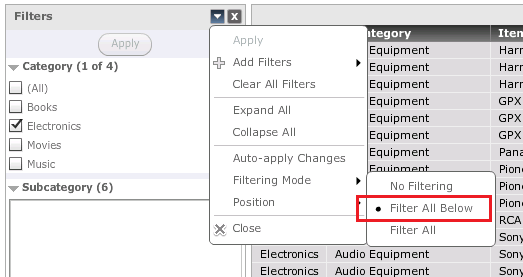
  • Add two filters: the first filter is based on Category with checkbox style and the second filter is based on Subcategory with search box style, set the option "Filtering Mode" to "Filter All Below",  as shown below:
ka04W000000Oh96QAC_0EM4400000025lt.jpeg
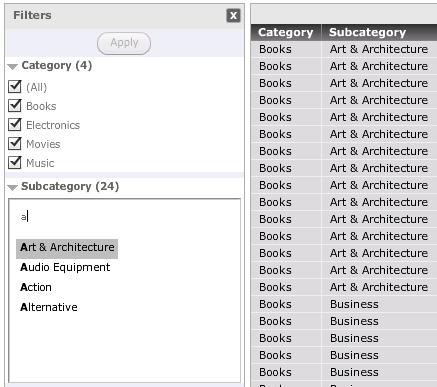
  • Search Subcategory with the letter "a" and all the elements with "a" are returned, as shown below:
ka04W000000Oh96QAC_0EM4400000025lz.jpeg
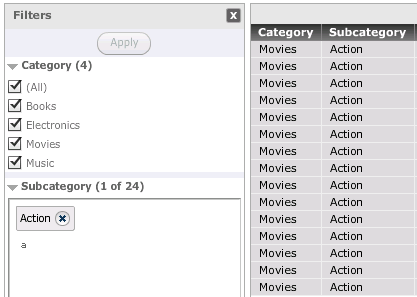
  • Select the Subcategory element "Action" and click "Apply" to apply the filter condition.  Search with the letter "a" again and note that no element is returned, as shown below:
ka04W000000Oh96QAC_0EM4400000025lv.jpeg

 
CAUSE: 
This is a known issue with Strategy Web 9.4.1.
 
ACTION: 
Please contact Strategy Technical Support for the update on this issue.


Comment

0 comments

Details

Knowledge Article

Published:

June 1, 2017

Last Updated:

June 1, 2017