EducationSoftwareStrategy.com
StrategyCommunity

Knowledge Base

Product

Community

Knowledge Base

TopicsBrowse ArticlesDeveloper Zone

Product

Download SoftwareProduct DocumentationSecurity Hub

Education

Tutorial VideosSolution GalleryEducation courses

Community

GuidelinesGrandmastersEvents
x_social-icon_white.svglinkedin_social-icon_white.svg
Strategy logoCommunity

© Strategy Inc. All Rights Reserved.

LegalTerms of UsePrivacy Policy
  1. Home
  2. Topics

KB236815: The radio list input displays an extra empty button when running a Transaction Services document with MicroStrategy Mobile for iPad application 9.5


Community Admin

• Strategy


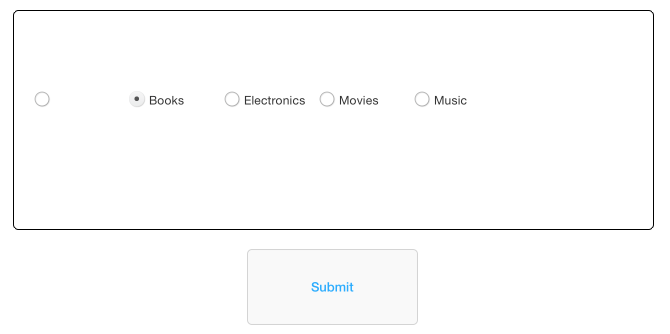
This Knowledge Base article describes radio list input displays an extra empty button when running a Transaction Services document with MicroStrategy Mobile for iPad application 9.5. This is a behavior change in MicroStrategy Mobile for iPad application 9.5. 

SYMPTOM: 
The radio list input displays an extra empty button when running a Transaction Services document with Strategy Mobile for iPad application 9.5, as shown below:
ka04W000000OaUyQAK_0EM4400000029yy.jpeg

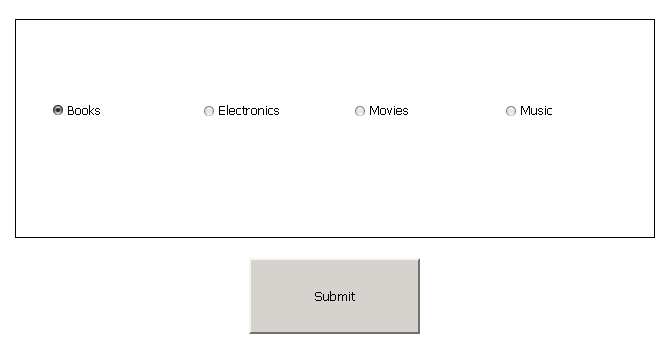
Run the same Transaction Services document in Web, note that there is no extra button, as shown below:
ka04W000000OaUyQAK_0EM4400000029z1.jpeg

 
CAUSE: 
This is a behavior change in Strategy Mobile for iPad application 9.5.  Tapping on this empty button will clear the selection and bring back the default values. 
 
ACTION: 
Currently there is an enhancement raised to disable this feature to avoid the inconsistent behavior between Web and Mobile. Strategy will continue to investigate and post updates as soon as they are available.
KB236815


Comment

0 comments

Details

Knowledge Article

Published:

May 23, 2017

Last Updated:

December 30, 2018