EducationSoftwareStrategy.com
StrategyCommunity

Knowledge Base

Product

Community

Knowledge Base

TopicsBrowse ArticlesDeveloper Zone

Product

Download SoftwareProduct DocumentationSecurity Hub

Education

Tutorial VideosSolution GalleryEducation courses

Community

GuidelinesGrandmastersEvents
x_social-icon_white.svglinkedin_social-icon_white.svg
Strategy logoCommunity

© Strategy Inc. All Rights Reserved.

LegalTerms of UsePrivacy Policy
  1. Home
  2. Topics

KB237124: The Group By section displays all elements on a separate page in MicroStrategy Mobile 9.4.x and 10.x


Community Admin

• Strategy


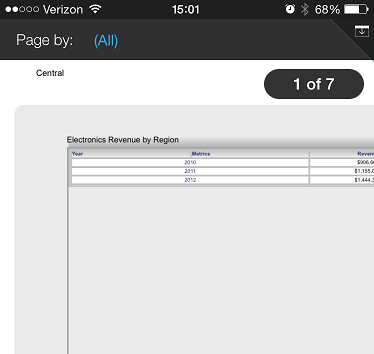
In MicroStrategy Mobile 9.4.x and 10.x, selecting the option for 'All' in the Group By forces each attribute element to be displayed on a separate page.  This forces the user to go from page to page to view the rest of the data, as opposed to scrolling on the same page, as in MicroStrategy Web.

SYMPTOM:
In Strategy Web 9.4.x and 10.x, users can add an attribute to the Grouping section of a Report Services Document.  If the option for 'All' is selected in the Grouping, all of the attribute elements will be displayed on a single page in the document, one under the other.  The page will increase in size dynamically, allowing the user to scroll through all of the contents of the document in the same page. In Strategy Mobile 9.4.x and 10.x, selecting the option for 'All', instead, forces each attribute element to be displayed on a separate page.  This forces the user to go from page to page to view the rest of the data, as opposed to scrolling on the same page, as in Strategy Web. The pagination is shown in the image below.
 

ka04W000000OdfSQAS_0EM4400000029y0.jpeg

 
STEPS TO REPRODUCE:

  1. Create a document with a single attribute in the Grouping.
  2. Insert a text box in the Grouping header section.
  3. Add a grid to the Body section to extend it down past a single page length.
  4. Run in Strategy Web in Interactive and notice that when "All" is selected in the Grouping that the document simply extends down and does not paginate.
  5. Run in Strategy Mobile; select a single element in the Grouping and notice it is possible to scroll to the bottom of the document.
  6. Select the All option in the Grouping and notice that there are now pages for each grouping option.

 
CAUSE:
This is working by design in Strategy Mobile 9.4.x and 10.x. 
 
ACTION
Currently this issue is still being reviewed for feasibility by our Technology team and it is not scoped for any upcoming scheduled Strategy release.
 
This issue has been logged with a Strategy internal reference number 480103.


Comment

0 comments

Details

Knowledge Article

Published:

April 6, 2017

Last Updated:

April 6, 2017