EducationSoftwareStrategy.com
StrategyCommunity

Knowledge Base

Product

Community

Knowledge Base

TopicsBrowse ArticlesDeveloper Zone

Product

Download SoftwareProduct DocumentationSecurity Hub

Education

Tutorial VideosSolution GalleryEducation courses

Community

GuidelinesGrandmastersEvents
x_social-icon_white.svglinkedin_social-icon_white.svg
Strategy logoCommunity

© Strategy Inc. All Rights Reserved.

LegalTerms of UsePrivacy Policy
  1. Home
  2. Topics

KB237128: Negative values display as positive in the tooltip of a Pie Graph in MicroStrategy Web


Community Admin

• Strategy


Negative values display as positive in the tooltip of a Pie Graph in MicroStrategy Web 9.4.1.

SYMPTOM
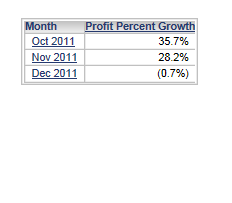
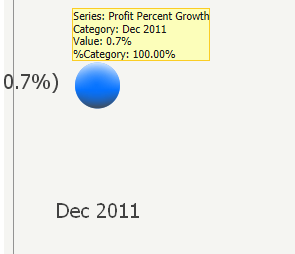
In Strategy Web 9.4.1 Hotfix 6 and 10.x, users have the ability to hover the mouse over an element in a graph to see the tooltip.  This tooltip can be configured to display data based on the element that the mouse is hovering over.  If the tooltip on a pie graph contains negative values, these values will appear as positive numbers.  In the screenshots below, notice that the negative value in the grid is displayed as a positive number in the pie graph tooltip.
 

ka04W000000OdbaQAC_0EM4400000025do.jpeg
ka04W000000OdbaQAC_0EM4400000025dn.jpeg


STEPS TO REPRODUCE

  1. Using Strategy Tutorial project, create a report with Quarter and Month attributes and Profit Percent Growth metric.
  2. Create a prompt on Quarter.
  3. Create a document using the above report as a dataset, and add Month and Profit Percent Growth to a grid on the document.
  4. Change the grid to a Pie Graph with tooltips enabled.
  5. Run the document and answer the prompt with Q4 2011.
  6. Hover the mouse over December 2011 and notice the tooltip says '0.7%'.
  7. Change the graph to grid view and run the grid.  Notice that the actual value for December 2011 is -.07%, so the tooltip isn't displaying negative values.

 
CAUSE
This is a known issue in Strategy Web 9.4.1 Hotfix 6 and 10.x.
 
ACTION
Strategy will continue to investigate and post updates as soon as they are available.


Comment

0 comments

Details

Knowledge Article

Published:

June 15, 2017

Last Updated:

June 15, 2017