EducationSoftwareStrategy.com
StrategyCommunity

Knowledge Base

Product

Community

Knowledge Base

TopicsBrowse ArticlesDeveloper Zone

Product

Download SoftwareProduct DocumentationSecurity Hub

Education

Tutorial VideosSolution GalleryEducation courses

Community

GuidelinesGrandmastersEvents
x_social-icon_white.svglinkedin_social-icon_white.svg
Strategy logoCommunity

© Strategy Inc. All Rights Reserved.

LegalTerms of UsePrivacy Policy
  1. Home
  2. Topics

KB237187: First element is not always highlighted in a Search Box Selector result list in Express Mode in MicroStrategy Web 9.4.1.


Community Admin

• Strategy


This article describes an issue with the Search Box selector limited to Express Mode

SYMPTOM
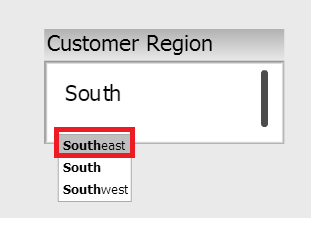
In Strategy Web 9.4.1, users can add a Search Box Selector to type in element names in order to display a list of attribute elements to choose from. In Flash mode, the first element in the list is highlighted, so pressing "Enter" will automatically populate the selector with the first element, as shown below.
ka04W000000OgfKQAS_0EM4400000025dc.jpeg

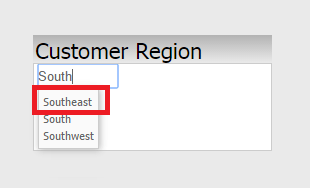
However, in Express Mode, the highlight of the first element can disappear as more letters are typed into the search box, as shown below:
ka04W000000OgfKQAS_0EM4400000025dd.jpeg

 Notice how southeast is not actually highlighted.
 
STEPS TO REPRODUCE
To reproduce the issue in the Strategy Tutorial project, follow these steps:
  • Create a document with a dataset that includes the "Region" attribute.
  • Add a search box selector that sources from "Region".
  • Run the document in Flash Mode.
  • Type in "South" into the Search Box selector, and notice 3 elements appear. The first element is selected by default, as shown below:
ka04W000000OgfKQAS_0EM4400000025dc.jpeg
  • Run the document in Express Mode.
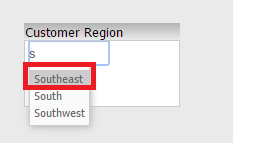
  • Type "S" into the Search Box selector. Notice 3 elements appear, and the first one is selected by default, as shown below:
ka04W000000OgfKQAS_0EM4400000025du.jpeg
  • However, continue typing in "South". Notice the first element is no longer selected by default.

 
CAUSE
This is a known issue in Strategy Web 9.4.1-10.x.
 
ACTION
This issue was reviewed for feasibility by our Technology team and was not scoped for any upcoming scheduled Strategy release. Strategy will continue to post updates as soon as they are available.
 
WORKAROUND
As a workaround, users can manually select the element, use keyboard arrows to select the desired element, or use Flash mode.


Comment

0 comments

Details

Knowledge Article

Published:

June 13, 2017

Last Updated:

June 13, 2017