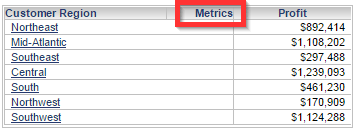
In a Report Services Document in Strategy Web 9.4.1, a Microchart Widget has the “Metric” column header to identify which column refers to the metric(s) in the widget, as shown below:

When viewing the Microchart Widget in Editable mode, the “Metric” column header can also be seen in grid view, as shown below:
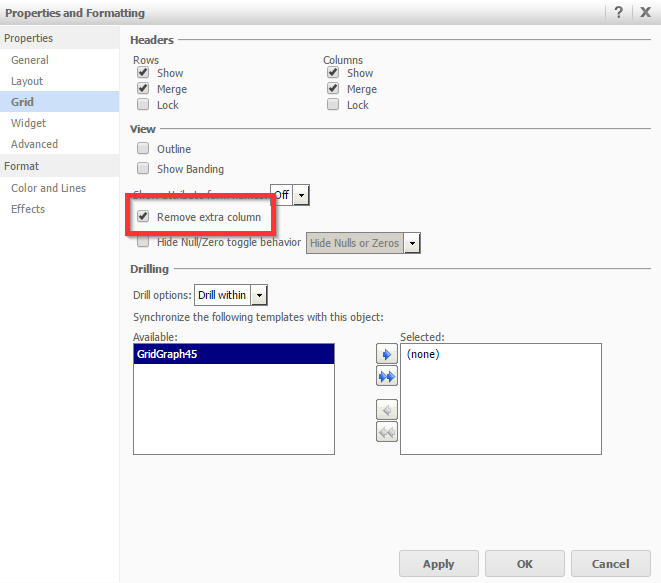
The “Metric” column header can be removed in grid view, by enabling the “Remove extra column” setting in the “Properties and Formatting” window of the widget, as shown below:
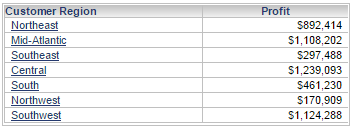
After doing so, the “Metric” column header disappears when viewing the Microchart in Editable mode:
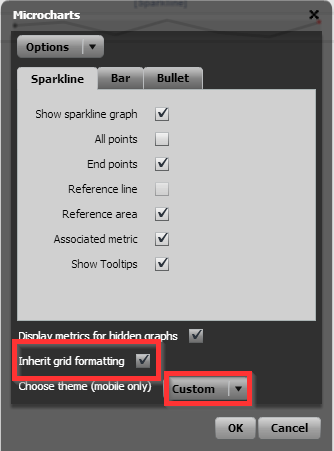
In order to inherit the grid formatting, the “Inherit grid formatting” setting can be enabled in the properties window that appears after right-clicking the Microchart in Interactive or Flash mode. In addition, the "Choose theme" setting should be set to "Custom" in order for the "Inherit grid formatting" setting to be able to be selected, as shown below:
However, even after doing so, the “Metric” column header still appears in the Microchart:

This is a limitation in Strategy Web 9.4.1 for the Microchart Widget. The “Inherit grid formatting” setting only inherits select properties, which does not include applying the “Remove extra column” setting. A request has been logged to address this issue.
Currently this issue is still being reviewed for feasibility by our Technology team and it is not scoped for any upcoming scheduled Strategy release.
